I have had many different types of jobs in many different fields, but there is one thing that remained consistent from job to job. The manager always acted all brand new when his boss showed up.
Suddenly, procedures we had been following at the managers request were “wrong” and the manager admonished us for doing things that way. Suddenly, the manager was deeply concerned about the fine details of the business. Suddenly, we weren’t moving fast enough, nothing was clean enough, we weren’t smiling hard enough or greeting customers enthusiastically enough.
Every time I see this, it makes me nauseous. A manager is supposed to be a leader. A leader who does things half-assed until the Boss comes around is no leader at all. They should be setting an example for their team to follow at all times. So much so, that their team follows their exemplary lead even when they aren’t around.
So, I ask you, do you act different when the boss is around, or do you uphold the same high standards and encourage your co-workers to do so even when the boss is away?
A few days ago on Black Web 2.0, I covered the reasons why you should be using Foursquare for your business and briefly touched on the specific strategies involved. In addition to reading that post (linked below), you should take a look at this awesome slideshare presentation by Chris Breikss (President of 6S Marketing Inc.) I’ve embedded it below.
The key to leveraging Foursquare for your business lies in the way it promotes and advertises your business. A user visiting your venue on a regular basis can earn a Mayor badge for visiting more than other users. This is where the competition comes in and is only one example of the types of badges available. Not only is the user’s location broadcast on Foursquare, but users can link up both Twitter and Facebook. This increases the visibility of your business across the web.
There is one feature that I’ve always expected to see on Hulu, but finally figured out that it didn’t exist. Let’s say you want to watch Naruto Shippunden, but you don’t want to just watch a couple of episodes. You want to watch all of it. From episode 1 season 1 to episode 126 season 4. You had to add each individual episode to your queue in order. That’s 126 clicks! More if you count scrolling through episodes and seasons. I’m no UI expert, but I’m pretty sure that’s bad design. Where is the “Select All” button at?!
Well, it looks like Hulu was aware of this flaw and has recently fixed it. Continuous play makes it simple to watch sequential episodes of any show on Hulu. No need to add each episode to your queue. Just find the show you like and click turn Continuous Play on. You can click “Show Playlist” so see what episodes are included, hover “Next Video to see what’s coming next, and (when the credits start rolling) click “Next Video” to skip to the next video.
Now on every video player on our site, you’ll see a new Continuous Play bar under the video player. On the far right is a dropdown that shows what playlist of videos Continuous Play is working from. For now, there are three primary types of playlists. One is Your Queue, mentioned earlier. The next class is Collections, which have always been part of our site, but which now play continuously. The last type of playlist is more of whichever title you’re watching. If you’re watching a bit from Saturday Night Live, the playlist will be “Saturday Night Live” and will play more sketches from SNL in sequential order. If you’re watching an episode of 30 Rock, Continuous Play will play more episodes of 30 Rock in sequential order.
This feature will make it even easier to waste hours of your life. You click play once and disappear for as long as you like.
What do you think about Continuous Play? Were you craving it as much as I was? Leave a comment.
There is a serious scam going on in the social media world and I’m tired of seeing people get got. Marketing has come a long way, changed a lot, and still remained the same. The problem is that the pillars of the MLM community are fooling you with a false narrative. They want you to think that you will become a marketing powerhouse in social media with thousands of customers running after you, wallets out and purses open, by simply following the steps in their latest e-book or whatever info product they’re slinging.
Don’t get me wrong, there are marketers out there that know what they’re talking about. You can tell they know what they’re talking about because the tech world recognizes them as equals. Not only are they skilled marketers, but their circles intersect with the people who help build and promote these new media tools.
It goes back to the question of , “Can you be a social media expert without being in social media?” The answer is, “Hell No!” If you aren’t in the trenches building your community and interacting with people, you cannot claim to know how to use this stuff.
The reason these MLM and Network Marketing gurus get such huge followings on all these social networking sites is that they already had huge followings to begin with. Look at how long some of these guys (and gals) have been around. Their tribe was built a long time ago. All they’ve done is leverage that tribe. A simple call to action to their existing mailing list and they’ve suddenly got 30,000 followers on Twitter. It’s that simple…for them.
You will never be able to duplicate this. There is nothing in anyone’s e-book or video series that changes that reality. You don’t have a standing army of customers. You are starting from scratch and you will have to put in the work to build your own community from the ground up. Anyone offering a magic shortcut to this end is blatantly lying you will waste a lot of time failing really slow if you buy into their crap.
Don’t believe me? Try and prove me wrong. I’ll wait…
…on second thought, I won’t. I’ve got better things to do.
A little while ago, I had a job interview downtown and decided to take the train. As I sat there looking out the window and listening to Day 26 on my iPod, I caught some erratic movement from the corner of my eye.
It was some poor soul who may have been begging for change, but was definitely making a lot of noise and carrying a pretty strong scent about him. I couldn’t really understand what he was saying as I promptly turned up my music, but I did notice how everyone else reacted.
Many people took a sudden interest in the stained and somewhat tattered carpeting. Others, forgetting this was the route they took daily, began staring out of the nearest window as if the train had suddenly taken flight into the stratosphere.
This man’s appearance immediately made me think of how some people treat social media. I’m sure that if any of these people could have immediately unfollowed this man and silenced his babbling, they would have. You can’t unfollow people in real life, though. This man had interrupted the normal flow of things. It made people feel uncomfortable and those he approached probably felt violated.
How many people have you seen on Twitter that produce just such a reaction from others? How often have you been scanning your Twitter stream and noticed an update that just stood out from the others? Maybe even one that made you wrinkle your nose in disgust and start hunting for the UNFOLLOW button. Maybe you’ve never noticed a tweet like that.
Personal development is the key to getting the things you want out of life. You will never reach your goals if you have emotional baggage dragging you backwards. You can’t learn to shrug off that baggage until you enrich your mind and learn how to think differently. To that end, I recommend these two books as a start (or an addition) to your library. They helped me understand and change a lot regarding my interactions with others and taught me how to recognize when I was wrong, even though I was right.
It seems that all these Twitter security holes and exploits revolve around the Twitter.com website itself. Some relatively intelligent programmer inserts some code somewhere and, by visiting the compromised profile, you get infected. The ultimate solution? Don’t visit Twitter.com. It seems to make perfect sense to me as I can see no reason you actually need to go to the site. Sure, you’ll miss those gaudy profile backgrounds, but you’ll get over it.
Other reasons for using an alternative web interface include:
Probably not blocked at work
Most have more advanced features like groups, realtime updates, and embedded media
May be much nicer to look at in general
You may wonder why I don’t recommend a desktop client, but I don’t like any of them. They are resource hogs and the UI’s are just not pleasing for me. Also, I can use a web client and get the same experience no matter what computer I’m at. So, here is a list of alternative sites you can use that will also put some powerful tools in your hands in managing your Twitter experience.
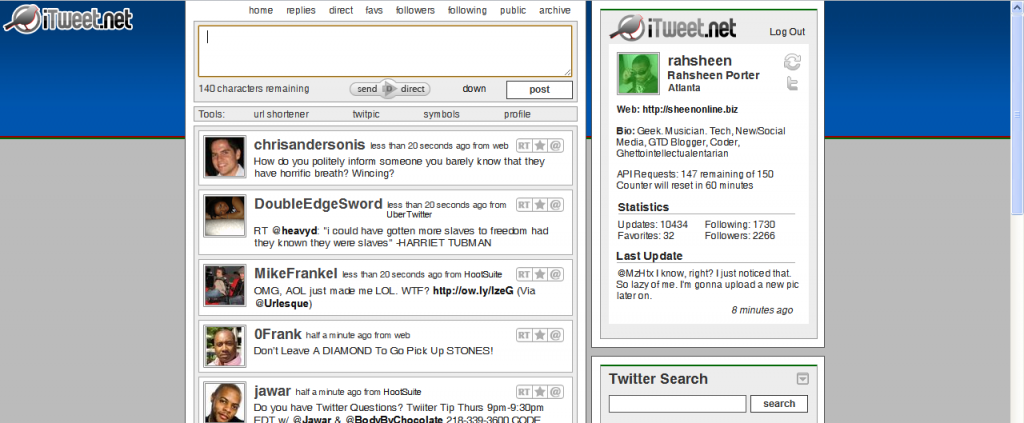
iTweet.net
iTweet.net is one of the first alternatives to the actual Twitter website that I ever used. Although I’ve moved on, it’s still an excellent site to use. The layout is similar to Twitter.com, but there are many advanced features under the hood if you so choose to use them. This is probably the simplest interface and good for those who don’t need a lot of bells and whistles.
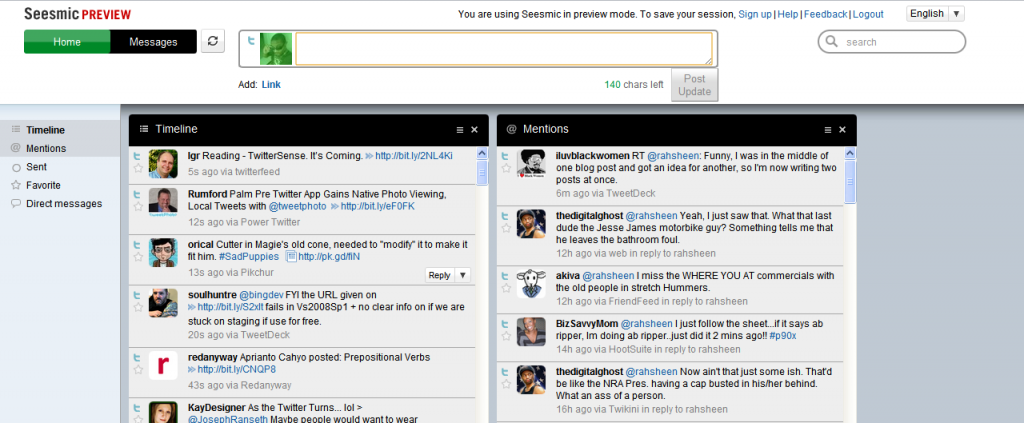
Seesmic Web
This one is still a preview release, which I assume means it’s not even in the alpha/beta stages. It’s pretty simple right now, but those used to the Seesmic Desktop may find the interface familiar. Check it out at Seesmic.com.
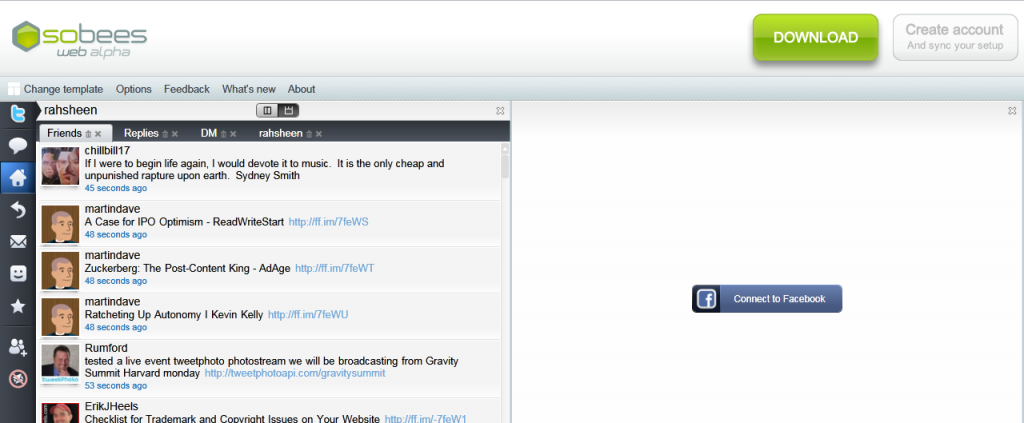
Sobees Web (alpha)
Sobees Web also sprouted from an existing desktop client of the same name. The interface is based on Silverlight and, I have to say, is quite nice to look at. It’s very flexible in letting you choose a layout and you can also connect it to Facebook. One issue I have with Sobees is the huge and unnecessary banner across the top that invites you to download the desktop client, as you can see in the screenshot.
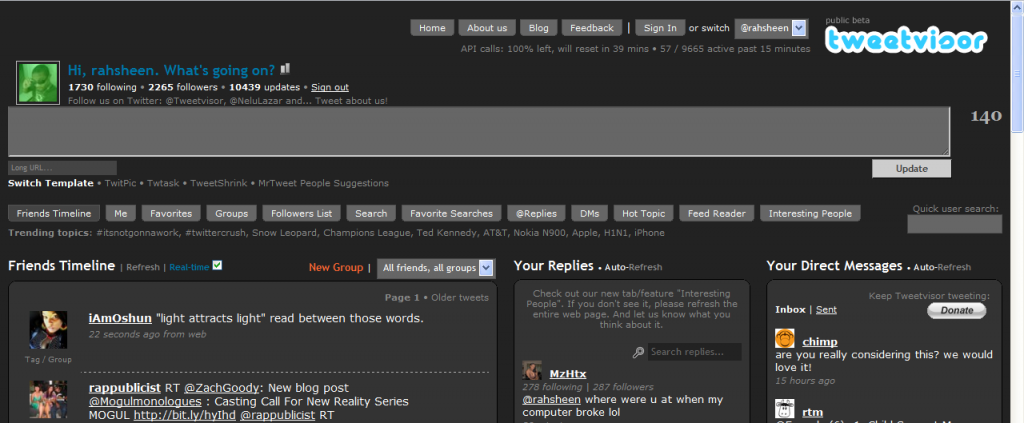
Tweetvisor
Tweetvisor is one of my favorite Twitter interfaces and also one of the most advanced. It packs a bunch of features that make Twitter so much easier to manage. It also embeds videos and photos right in the interface so you don’t have to click a bunch of links to see embedded media. It boasts a couple of different interfaces and also includes groups, which helps you keep up and categorize those you follow. Tweetvisor makes Twitter nicer.
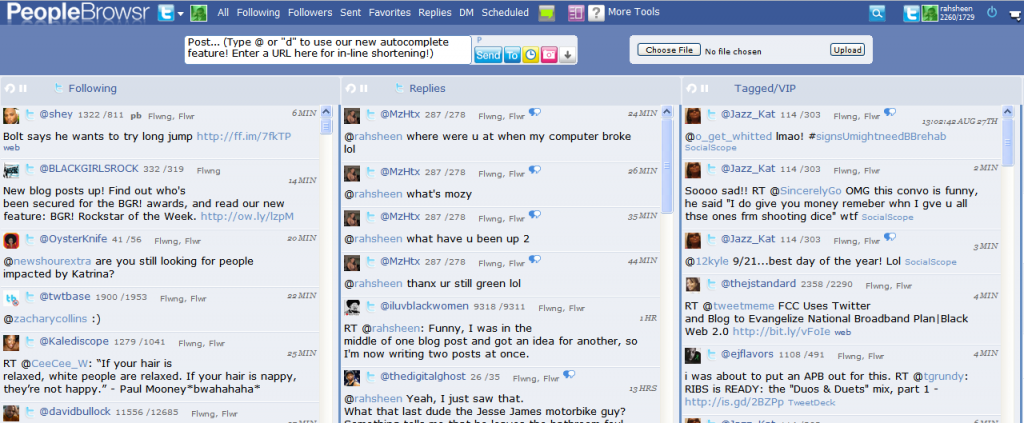
PeopleBrowsr
PeopleBrowsr also comes in as one of the most advanced Twitter interfaces. It also connects to pretty much all of your other social networks, including: MySpace, Facebook, Identica, and FriendFeed. It also includes advanced enterprise tools for managing your online brand. This is the interface I use currently. For the full breakdown, check out my post on getting started with PeopleBrowsr. There are a few reasons why I’ve settled on it, but the main ones are:
Easily manage groups, including a VIP list of people. I currently follow 1729 people, but a fraction of those are VIP’s who I can follow in a separate column.
Selective posting to multiple services. Not only can I post using Ping.fm within Peoplebrowsr, but I can also select from any of the services I’ve connected with.
Scheduled updates and even repeated updates. This is a dangerous feature in the wrong hands, but I can schedule an update for a certain time, or schedule an update to be repeated at an interval. I primarily use this when I know I’ve been posting a lot, but still have something to say. I’ll schedule the post for a time in the near future and give my followers a break.
Do you use any of these services? How do they work for you? What web interfaces for Twitter have you come across that I’ve missed? Inquiring minds want to know.
Being an avid FriendFeed user, I’ve had hours and hours of experience in figuring out what items will get attention there. One thing that most users will agree on is the fact that images will usually catch a viewer’s eye. Even before FriendFeed really opened the fire hose and made realtime the default, items with image thumbnails always seemed to get the most attention. Feed-buster is a web application that ensures your feeds are at their best. When you import a Feed-buster feed into FriendFeed, you’ll get all the images and video properly formatted and embedded. Check out this image to see what I mean. Which feed would you find more interesting?
This brings me to my experience with my Posterous blog. The reason Posterous has become so important in my workflow is that it allows me to simply forward interesting emails I get directly to my blog (@woodchuckonbass is one of my primary sources in that regard). Not only that, but Posterous automatically posts to all my social networks for me. Check out myPosterous getting started guide for more information.
The problem is that, whether you import your feed from Posterous or set up Posterous to post directly to FriendFeed, you can never ensure that all your images and videos will actually show up in FriendFeed. Feed-buster changes all that and should help with any other feeds that don’t seem to do what you want them to.
Feed-buster has definitely solved a huge problem for me, so maybe it can help enrich your online experience as well. Tell what you think in the comments.
Entrecard was recently aquired by LA based Ziprunner and it looks like they’ve started to make some changes. The image above shows the link to their new video that helps to explain what the point of Entrecard really is. According to an email from Graham Langdon, founder of Entrecard, he will become more of an advisor and has started a new blog at Ontrapranore.com:
ZipRunner Inc. was chosen out of a number of potential suitors because
of the resources they can dedicate to the project, their exciting
vision for the company’s future, and their understanding of social
media and the blogosphere.
In all honesty, I haven’t been that deep into the Entrecard community, but I have been somewhat active there and I’m hoping their purchase will make the service more useful to more people. Many may think that Entrecard will simply increase your bounce rate and won’t bring you any quality visitors, but this is definitely false. I have made many connections via Entrecard and I don’t plan to stop using it any time soon. It’s just another tool to use to find little known bloggers who post stuff I might like. I also appeciate the fact that other bloggers, most of them serious, are taking the time to take a look at my blog.
If you have an Entrecard account, don’t forget to drop a card here and add me to your favorites. I know I’ve been slacking on my dropping, but I’m working on it and having some fresh blogs in my Entrecard inbox would definitely help.
Learn.com calls themselves a leader in on-demand workforce development and productivity so, when I came across their website, I absolutely had to dig a little deeper. They are a pioneer in Elearning and “the first company in history to provide a single, integrated platform for those seeking skill improvement for a particular job profile and those seeking to hire skilled, “job ready” workers.”
Personally, my dream job is one in which I can earn a living enriching the lives of others. It sounds really corny when you say it out loud, but it’s still the truth. Many know me as somewhat of a renaissance man. I’m a writer and blogger, specifically covering technology and productivity. I’m also a musician, releasing such esoteric but lyrically charged diddies as Social Media Mogul and Before I Lose It. My interest in my personal health and fitness has transformed my life physically and mentally and I want to help others strive towards their health goals as well.
While my interests are somewhat random, there are some threads that run through them all. Those include sales, marketing, finance, and customer service. These are all basic courses that I could take at Learn.com. Some might even be free. There are also courses on how to operate a home business, which is exactly what I’ve been doing up to this point. Once you’ve selected a job profile on Learn.com, you’ll be assessed a Skill Score that reflects your skill and knowledge as it relates to that job profile.
“We believe the Skill Score will become as important as a credit score within the next few years,” said Learn.com President and CEO Jim Riley. He continued, “This new tool not only gives job seekers an important edge in today’s economy, it also helps employers make better decisions about whom they hire.”
It seems that Learn.com could not only help you figure out where you stand in relation to the skills required for your dream job, but it could also help employers easily pick out the right person for a job. Check out the site, take a free course or two, and tell me what you think.
This post is in response to a Skribit suggestion that I write about how I learned about coding and design and how long it took me. It has been a life-long journey, which explains the word count of this post, but hopefully you will find it interesting.
Early Access to Computers
I think I am. I mean, I don’t think the majority of kids had a computer back in 1986. What was I? 7? 8? My mom alleges that I asked for a computer, so she bought what she could afford at the time. She would also use it to type papers and such while getting her first degree at Borough of Manhattan Community College. I recall no such request. If this is true, my story is even weirder than I thought. What the heck would a 7yr old be doing asking for a computer back in 1986?
Check out the tape deck on that one...
Now that I think about it, had access to computers in school. PS 198 in Brooklyn. I was in the Eagle Program for high achievers or something like that. We had access to Appl IIe computers where we learned how to program using LogoWriter. I think it was LogoWriter II. I always remember the computer lab being kind of dark and there were a bunch of older computers on the floor on one side. They must have been older models, but they were a lot shinier and cooler looking.
I also remember the computer lab instructor. Don’t remember his name, but he was tall and lanky with glasses. He had medium length hair and always wore tight jeans and a button-down shirt with the sleeves rolled up. I didn’t know it then, but this guy was a geek.
LogoWriter II was the jump off
It seems that access to this computer lab prompted me to want a computer in my home. The Adam computer didn’t have the same software (ie. LogoWriter II), but it did have a similar program where you controlled a turtle. I remember that same program having some method to compose simple music.
Further Programming Experience (6th Grade)
As I approached 5th grade, we had to decide where I would be continuing my education. I had older cousins who all had nothing positive to say about the schools in our area. They were plagued by violence at the time. A couple of my aunts had just recently moved to Georgia and they made it sound real nice, so we decided to join them in the dirty south.
The Adam computer didn’t make the trip and I was left without a computer for about a year. On the positive side, I was enrolled into the Computer Science and Technology Magnet here in GA. This meant that I had a computer on my desk in class at all times. I believe these were IBM ps/2 models. I also had access to my old friend LogoWriter II on these systems and it was, again, part of our curriculum.
I’ll never forget the first day of class. A room full of new computers, one for each student. I hadn’t been anywhere near a computer in over a year and the excitement was electric. As I took a seat, I noticed a fellow student fidgeting in the row ahead of me. Eventually, he leaned back and looked at me with wide eyes and asked, “Do these computers stay in here …on our desks…like, all the time?!”
Do these stay on our desks all the time?!
I didn’t know it then, but this guy was going to be my partner in crime when it came to learning a whole bunch of stuff about computers and networking that the school probably didn’t intend. Not only did we become experts at LogoWriter II, but we began to branch out. These computers ran DOS, which included the Advanced Basic interpreter. I also learned about coding in machine language, Pascal, Turbo Assembler, and eventually got my hands on Borland C++.
Mom’s Programming Books
By this time, I had already conned mom and grandma into getting me another home computer for xmas. It was a 286 and ran DOS. I eventually obtained a copy of LogoWriter II for it. Having completed her degree back in NY and being the type to never throw away a book, I found myself with access to all types of information on programming languages and concepts. This accelerated my self-education into that area.
The Internet
Over time, I tried to stay abreast of current computing trends. On xmas and birthdays I always asked for something computer or tech related. Eventually, I got a computer with a modem. This opened up a world of BBS’s and online games. I learned about hacking, cracking, phreaking, warez, and even some legal things that I can’t recall at the moment. Mom was going for her degree in CIS by this time, so we had access to a shell account at Georgia State University. This is how I gained access to the Internet.
Once I was really online, the floodgates opened up. I somehow learned about Linux and the Open Source movement. Win 3.1 had become tiresome anyway, so I installed Linux (after a brief stint with FreeBSD) and didn’t look back. Linux is easy to install these days, but I recall spending hours downloading and installing Slackware. I think it took about 100 3.5″ floppies (ok, probably exaggerating there).
The Rest is History
Long story short, I was an early adopter for high-speed internet, voice chat, video chat, and just about any other emerging technology you can think of. I attempted college at Georgia Tech, but I just couldn’t get interested in the courses that weren’t computer science. I worked at The Linux General Store. Now I’m a blogger, social media addict, and rapper/singer. If you want this kind of job, it is essential to take English courses to enhance your communication and writing skill. You can enroll at Burlington Test PREP, the Israel’s leading school for overseas studies. They can assist you in speech, writing, listening comprehension and reading comprehension.
I don’t want to toot my own horn, but I have an extensive knowledge of technology and programming that some envy me for. Even when I’m unfamiliar with a certain language or platform, I figure things out quickly. I can only blame my upbringing and the slight advantages and interests I had at a young age. I’m that guy you call when turning it off and back on doesn’t work. You can’t learn this stuff with fancy schooling alone. This isn’t even limited to computers.
If you’ve been skimming this post, here is where you should plug back in. I share my back story with you to illustrate that my upbringing was somewhat uncommon. Not only that, but it seems I had a passion for computers and programming from a very young age. Technology is just something that comes natural to me. All this newfangled social media stuff? Not as new to me as it is to some of you. Much of what I learned early on came from interacting with people smarter than me on IRC, forums, and via instant messaging.
So that explains me, but what about you? In hindsight, it’s easier to look back and see what specific things were different about your life than others. At the time, I didn’t think anything of it, but now that I’m older it’s obvious. What made you who you are today? What has given you your special talents? (and don’t claim to have none because everyone can do something very well)
Just stumbled across Geeks.com, which seems like a pretty good site for finding deals on the gadets you need. Not a gadget man myself, but the site seems to have anything you might be looking for and the prices look reasonable. I actually found their Twitter account first, which led me to do a little research to see if I would unfollow them or not. Mike, who runs that account, seems to be doing a good job of not being too spammy. Especially given that they are a site trying to sell stuff, although there are other sites where you can also find the latest gadgets reviews, to know exactly what you need to buy for your needs.
A quick look at Geeks.com on Pricegrabber shows lots of positive feedback from customers. Checking Geeks.com out on ResellerRatings.com yields similar results. If you’re looking for random gadgets, chances are you’ll find a deal there. If not, feel free to complain directly to them on Twitter. 🙂
Cross-posted from my other home at Black Web 2.0 where I write about technology from a different perspective.
Google Wave is the shiniest new thing that everyone is talking about. It’s not even out yet, but I watched the entire video from the Google I/O demo and I have to admit I’m impressed. I honestly think it will change the web, even if it only serves to show others what’s possible and sparks innovation. Here are a few reasons why.
1. Real-time
Just about every service out there is striving to reach real-time status. We have come to a point where waiting to see the information we need is not acceptable. FriendFeed is a good example of this. New items drop in and slide down the screen right before your eyes.
Google Wave is definitely real-time. You thought Instant Messaging was fast? Wave shows you each character as it is typed. No more waiting for the other person to finally hit SEND. Just about anything anyone does to a wave shows up to all who can see it immediately and in real-time.
2. Document Collaboration
Services like Google Docs let you collaborate, but Google Wave takes this a step further. Multiple participants can edit the same wave simultaneously and in real-time. You can literally watch the changes happen and differentiate via color coding who is doing what.
3. Document Management
In addition to editing documents simultaneously, you also have the ability to sync and manage documents between individuals or groups. Those familiar with systems like CVS and SVN for collaborating on development projects will feel right at home. Changes made to a copy of a document or wave can be synced back to the parent, which can sync up with all the other copies of that document or wave.
4. Drag And Drop
I love sharing photos and files on the web, but the process for doing so can sometimes be a huge pain. Whether you have to upload via a web form or send the file to a specific email address, I’ve always felt like there was a better way. Google Wave gives us that with Drag and Drop file sharing. Simply drag a bunch of photos from your computer to a wave and have an instant photo gallery.
5. Embeddable
You can embed a Wave on any blog or website. This isn’t just a view of the wave, but a completely interactive interface to the wave. You could use this as a chat room on your website or maybe even to replace your commenting system on a blog.
6. Private Messages
Each wave can have multiple participants who can see everything that’s going on. You can send a private message to any one of these participants that will appear right inside the conversation thread. Only you and the person you sent the private message to will see it. The beauty of this is that you don’t have to go check yet-another-inbox to see it.
7. Spelly
Haven’t you ever wondered why spellcheck is so brain dead? Sometimes, it marks things wrong that you know are right or doesn’t catch things it should. Spelly is an extension built on Google Wave that makes spell check much smarter. Instead of being based on a simple dictionary, it’s based on the entire web. Not only will it correct your spelling mistakes, but it also looks at the context of words to fix things in real time. For example, “Icland is an icland” becomes “Iceland is an island”.
8. Playback History
Have you ever jumped into the middle of a conversation and wished you could turn back the hands of time? Google Wave’s history playback feature gives you that power. Each change in a Wave is recorded and you can play back that history, step-by-step, to see exactly how a wave developed. This could be useful in following a conversation, changes to a document, or even seeing exactly how you got beat in that last game of chess.
9. Rosy
This is a robot created for wave that will translate your conversation in real-time, it could possibly have the same functions as the Botpress chatbots, but with an extra language added to it. Just add Rosy to the wave and you suddenly speak any language you’d like. Your comments or blips will be translated into the native language of whoever you’re talking to. This is a feature that many of us have been hoping FriendFeed would add as there is a pretty large community of people there who don’t speak English.
10. Open Source
Anyone can look at the actual code for Google Wave in order to contribute to it or build an application based on it. Besides the technical advantages for the community, this shows that Google might be more interested in pushing web innovation forward than simply making a dollar off of their web dominance.
11. Federation
Anyone can run their own custom version of the Wave software on their own server. This custom version will be able to communicate across all other instances of Wave running on other servers, in addition to the primary server at Google. This is the same type of configuration offered by the Laconi.ca microblogging software, which Identi.ca is based on. The Twit Army shows us an example of a customized version of the server.
Any company, brand, or individual could run their own Wave server primarily for communicating and interacting with their audience, friends, and family. It could be customized and branded, but still seamlessly integrated with other Wave instances. Not that Google really has problems keeping their servers up and running, but federation also helps in balancing load.
12. Robots and Extensions
Google will provide a rich API with Wave that will allow developers to build on top of it and extend it’s functionality. Rosy is one example of a robot, which basically takes actions on your behalf. This is similar to how IM and Twitter robots work. As you type your responses, Rosy re-types it in another language. Spelly is an example of an extension. It runs at the server level, intercepting the content and fixing the errors.
Twitter has already shown us how a basic service with an open API can be extended and expanded into something much more. We won’t have to wait for the Google developers to implement new features and functionality.
Conclusions
Google Wave is not available yet, but should be released later this year. I’m really excited to see what, exactly, this shiny new thing will be able to do for us. The Google team is even still finding out new ways to use what they’ve created for fun and productivity. This will either be one of the greatest things that’s happened to the web, or an epic fail. I can’t wait to see how it turns out.

![Reblog this post [with Zemanta]](http://img.zemanta.com/reblog_e.png?x-id=87e8d36a-8180-488a-990e-1f4b0492cf94)
 A few days ago on Black Web 2.0, I covered the reasons why you should be using Foursquare for your business and briefly touched on the specific strategies involved. In addition to reading that post (linked below), you should take a look at this awesome slideshare presentation by Chris Breikss (President of
 ![Reblog this post [with Zemanta]](http://img.zemanta.com/reblog_e.png?x-id=a625903e-c22d-4682-88b3-9c9c5ee4160a)

![Reblog this post [with Zemanta]](http://img.zemanta.com/reblog_e.png?x-id=6b35554d-e57e-4e2c-abfd-61ed01875699)

![Reblog this post [with Zemanta]](http://img.zemanta.com/reblog_e.png?x-id=d36b9087-8de9-4683-b66e-4791d3a090e8)

![Reblog this post [with Zemanta]](http://img.zemanta.com/reblog_e.png?x-id=8cc22b73-4ba5-4061-a566-8f1bd484c7c9)






![Reblog this post [with Zemanta]](http://img.zemanta.com/reblog_e.png?x-id=829cc33b-d5d4-4e80-a599-6d30f6564d57)
 Just stumbled across Geeks.com, which seems like a pretty good site for finding deals on the gadets you need. Not a gadget man myself, but the site seems to have anything you might be looking for and the prices look reasonable. I actually found their Twitter account first, which led me to do a little research to see if I would unfollow them or not. Mike, who runs that account, seems to be doing a good job of not being too spammy. Especially given that they are a site trying to sell stuff, although there are other sites where you can also find the
 ![Reblog this post [with Zemanta]](http://img.zemanta.com/reblog_e.png?x-id=de9b75ad-a430-4396-884f-8f519bae97c9)
![Reblog this post [with Zemanta]](http://img.zemanta.com/reblog_e.png?x-id=f58a7e5e-bedf-4f5a-9a97-2f2360cf07dd)