Personal development is the key to getting the things you want out of life. You will never reach your goals if you have emotional baggage dragging you backwards. You can’t learn to shrug off that baggage until you enrich your mind and learn how to think differently. To that end, I recommend these two books as a start (or an addition) to your library. They helped me understand and change a lot regarding my interactions with others and taught me how to recognize when I was wrong, even though I was right.
Avoid Twitter Exploits By Avoiding Twitter.com
It seems that all these Twitter security holes and exploits revolve around the Twitter.com website itself. Some relatively intelligent programmer inserts some code somewhere and, by visiting the compromised profile, you get infected. The ultimate solution? Don’t visit Twitter.com. It seems to make perfect sense to me as I can see no reason you actually need to go to the site. Sure, you’ll miss those gaudy profile backgrounds, but you’ll get over it.
Other reasons for using an alternative web interface include:
- Probably not blocked at work
- Most have more advanced features like groups, realtime updates, and embedded media
- May be much nicer to look at in general
You may wonder why I don’t recommend a desktop client, but I don’t like any of them. They are resource hogs and the UI’s are just not pleasing for me. Also, I can use a web client and get the same experience no matter what computer I’m at. So, here is a list of alternative sites you can use that will also put some powerful tools in your hands in managing your Twitter experience.
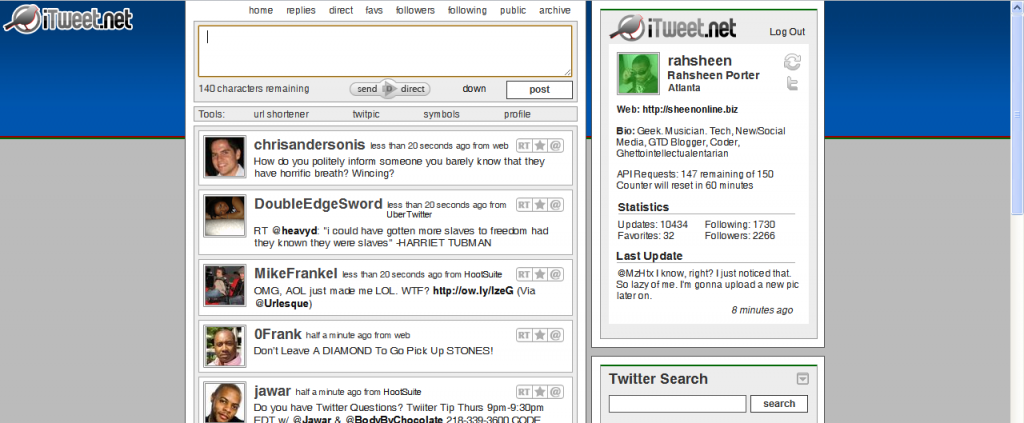
iTweet.net
iTweet.net is one of the first alternatives to the actual Twitter website that I ever used. Although I’ve moved on, it’s still an excellent site to use. The layout is similar to Twitter.com, but there are many advanced features under the hood if you so choose to use them. This is probably the simplest interface and good for those who don’t need a lot of bells and whistles.
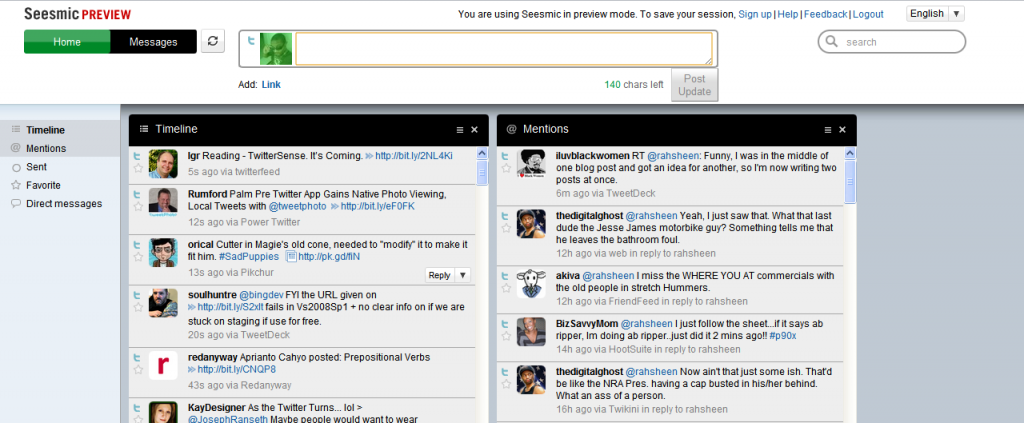
Seesmic Web
This one is still a preview release, which I assume means it’s not even in the alpha/beta stages. It’s pretty simple right now, but those used to the Seesmic Desktop may find the interface familiar. Check it out at Seesmic.com.
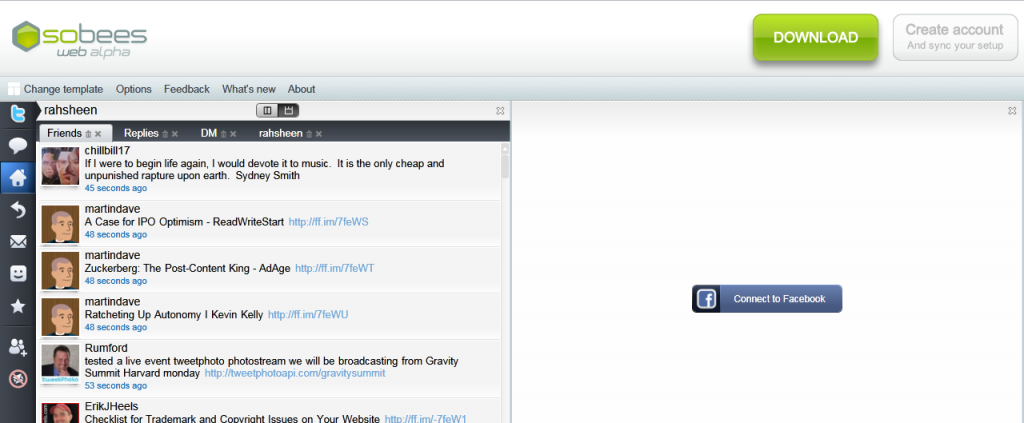
Sobees Web (alpha)
Sobees Web also sprouted from an existing desktop client of the same name. The interface is based on Silverlight and, I have to say, is quite nice to look at. It’s very flexible in letting you choose a layout and you can also connect it to Facebook. One issue I have with Sobees is the huge and unnecessary banner across the top that invites you to download the desktop client, as you can see in the screenshot.
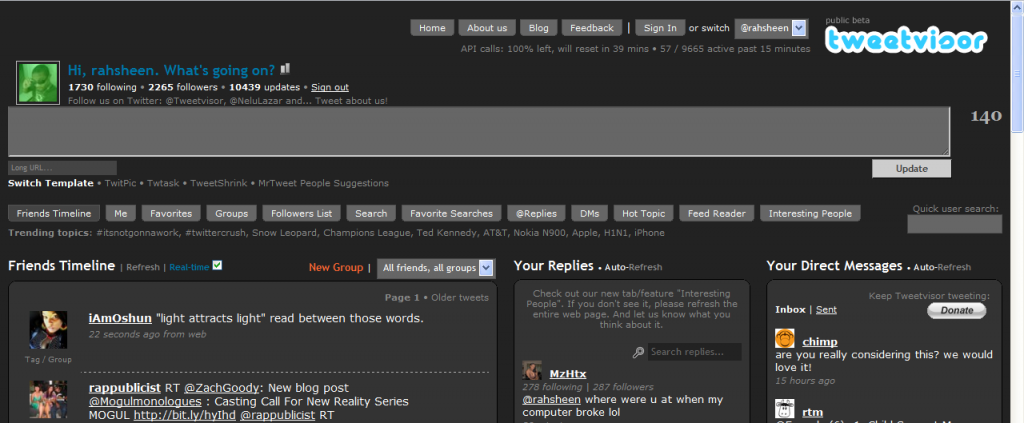
Tweetvisor
Tweetvisor is one of my favorite Twitter interfaces and also one of the most advanced. It packs a bunch of features that make Twitter so much easier to manage. It also embeds videos and photos right in the interface so you don’t have to click a bunch of links to see embedded media. It boasts a couple of different interfaces and also includes groups, which helps you keep up and categorize those you follow. Tweetvisor makes Twitter nicer.
PeopleBrowsr
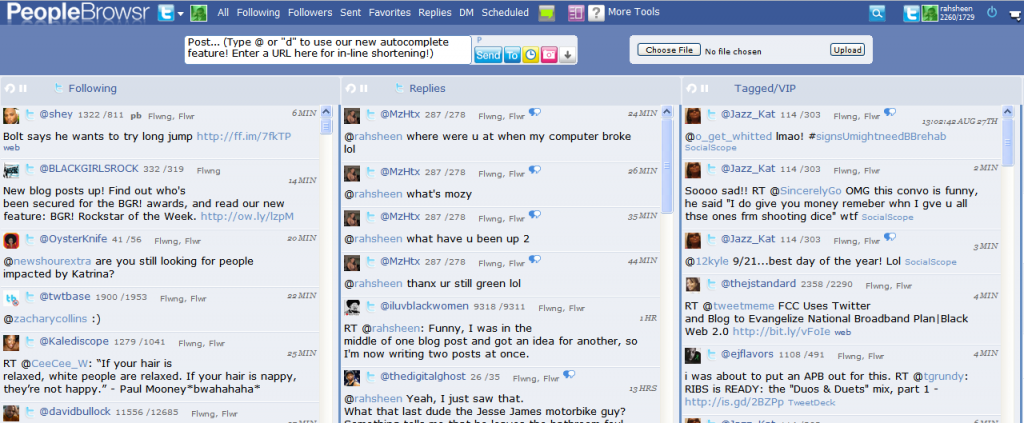
PeopleBrowsr also comes in as one of the most advanced Twitter interfaces. It also connects to pretty much all of your other social networks, including: MySpace, Facebook, Identica, and FriendFeed. It also includes advanced enterprise tools for managing your online brand. This is the interface I use currently. For the full breakdown, check out my post on getting started with PeopleBrowsr. There are a few reasons why I’ve settled on it, but the main ones are:
- Easily manage groups, including a VIP list of people. I currently follow 1729 people, but a fraction of those are VIP’s who I can follow in a separate column.
- Selective posting to multiple services. Not only can I post using Ping.fm within Peoplebrowsr, but I can also select from any of the services I’ve connected with.
- Scheduled updates and even repeated updates. This is a dangerous feature in the wrong hands, but I can schedule an update for a certain time, or schedule an update to be repeated at an interval. I primarily use this when I know I’ve been posting a lot, but still have something to say. I’ll schedule the post for a time in the near future and give my followers a break.
Do you use any of these services? How do they work for you? What web interfaces for Twitter have you come across that I’ve missed? Inquiring minds want to know.
Maximize Your Feeds with Feed-Buster
Being an avid FriendFeed user, I’ve had hours and hours of experience in figuring out what items will get attention there. One thing that most users will agree on is the fact that images will usually catch a viewer’s eye. Even before FriendFeed really opened the fire hose and made realtime the default, items with image thumbnails always seemed to get the most attention. Feed-buster is a web application that ensures your feeds are at their best. When you import a Feed-buster feed into FriendFeed, you’ll get all the images and video properly formatted and embedded. Check out this image to see what I mean. Which feed would you find more interesting?

This brings me to my experience with my Posterous blog. The reason Posterous has become so important in my workflow is that it allows me to simply forward interesting emails I get directly to my blog (@woodchuckonbass is one of my primary sources in that regard). Not only that, but Posterous automatically posts to all my social networks for me. Check out myPosterous getting started guide for more information.
The problem is that, whether you import your feed from Posterous or set up Posterous to post directly to FriendFeed, you can never ensure that all your images and videos will actually show up in FriendFeed. Feed-buster changes all that and should help with any other feeds that don’t seem to do what you want them to.
Feed-buster has definitely solved a huge problem for me, so maybe it can help enrich your online experience as well. Tell what you think in the comments.
Entrecard Gets Bought and Adds a Fancy New Video

Entrecard was recently aquired by LA based Ziprunner and it looks like they’ve started to make some changes. The image above shows the link to their new video that helps to explain what the point of Entrecard really is. According to an email from Graham Langdon, founder of Entrecard, he will become more of an advisor and has started a new blog at Ontrapranore.com:
ZipRunner Inc. was chosen out of a number of potential suitors because
of the resources they can dedicate to the project, their exciting
vision for the company’s future, and their understanding of social
media and the blogosphere.
In all honesty, I haven’t been that deep into the Entrecard community, but I have been somewhat active there and I’m hoping their purchase will make the service more useful to more people. Many may think that Entrecard will simply increase your bounce rate and won’t bring you any quality visitors, but this is definitely false. I have made many connections via Entrecard and I don’t plan to stop using it any time soon. It’s just another tool to use to find little known bloggers who post stuff I might like. I also appeciate the fact that other bloggers, most of them serious, are taking the time to take a look at my blog.
If you have an Entrecard account, don’t forget to drop a card here and add me to your favorites. I know I’ve been slacking on my dropping, but I’m working on it and having some fresh blogs in my Entrecard inbox would definitely help.
What’s Your Skill Score?
Learn.com calls themselves a leader in on-demand workforce development and productivity so, when I came across their website, I absolutely had to dig a little deeper. They are a pioneer in Elearning and “the first company in history to provide a single, integrated platform for those seeking skill improvement for a particular job profile and those seeking to hire skilled, “job ready” workers.”
Personally, my dream job is one in which I can earn a living enriching the lives of others. It sounds really corny when you say it out loud, but it’s still the truth. Many know me as somewhat of a renaissance man. I’m a writer and blogger, specifically covering technology and productivity. I’m also a musician, releasing such esoteric but lyrically charged diddies as Social Media Mogul and Before I Lose It. My interest in my personal health and fitness has transformed my life physically and mentally and I want to help others strive towards their health goals as well.
While my interests are somewhat random, there are some threads that run through them all. Those include sales, marketing, finance, and customer service. These are all basic courses that I could take at Learn.com. Some might even be free. There are also courses on how to operate a home business, which is exactly what I’ve been doing up to this point. Once you’ve selected a job profile on Learn.com, you’ll be assessed a Skill Score that reflects your skill and knowledge as it relates to that job profile.
“We believe the Skill Score will become as important as a credit score within the next few years,” said Learn.com President and CEO Jim Riley. He continued, “This new tool not only gives job seekers an important edge in today’s economy, it also helps employers make better decisions about whom they hire.”
It seems that Learn.com could not only help you figure out where you stand in relation to the skills required for your dream job, but it could also help employers easily pick out the right person for a job. Check out the site, take a free course or two, and tell me what you think.

The Story of Me and Technology
This post is in response to a Skribit suggestion that I write about how I learned about coding and design and how long it took me. It has been a life-long journey, which explains the word count of this post, but hopefully you will find it interesting.
Early Access to Computers
I think I am. I mean, I don’t think the majority of kids had a computer back in 1986. What was I? 7? 8? My mom alleges that I asked for a computer, so she bought what she could afford at the time. She would also use it to type papers and such while getting her first degree at Borough of Manhattan Community College. I recall no such request. If this is true, my story is even weirder than I thought. What the heck would a 7yr old be doing asking for a computer back in 1986?
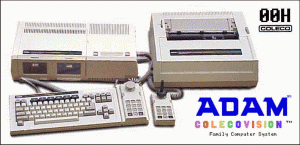
Now that I think about it, had access to computers in school. PS 198 in Brooklyn. I was in the Eagle Program for high achievers or something like that. We had access to Appl IIe computers where we learned how to program using LogoWriter. I think it was LogoWriter II. I always remember the computer lab being kind of dark and there were a bunch of older computers on the floor on one side. They must have been older models, but they were a lot shinier and cooler looking.
I also remember the computer lab instructor. Don’t remember his name, but he was tall and lanky with glasses. He had medium length hair and always wore tight jeans and a button-down shirt with the sleeves rolled up. I didn’t know it then, but this guy was a geek.

It seems that access to this computer lab prompted me to want a computer in my home. The Adam computer didn’t have the same software (ie. LogoWriter II), but it did have a similar program where you controlled a turtle. I remember that same program having some method to compose simple music.
Further Programming Experience (6th Grade)
As I approached 5th grade, we had to decide where I would be continuing my education. I had older cousins who all had nothing positive to say about the schools in our area. They were plagued by violence at the time. A couple of my aunts had just recently moved to Georgia and they made it sound real nice, so we decided to join them in the dirty south.
The Adam computer didn’t make the trip and I was left without a computer for about a year. On the positive side, I was enrolled into the Computer Science and Technology Magnet here in GA. This meant that I had a computer on my desk in class at all times. I believe these were IBM ps/2 models. I also had access to my old friend LogoWriter II on these systems and it was, again, part of our curriculum.
I’ll never forget the first day of class. A room full of new computers, one for each student. I hadn’t been anywhere near a computer in over a year and the excitement was electric. As I took a seat, I noticed a fellow student fidgeting in the row ahead of me. Eventually, he leaned back and looked at me with wide eyes and asked, “Do these computers stay in here …on our desks…like, all the time?!”
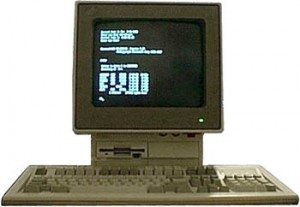
I didn’t know it then, but this guy was going to be my partner in crime when it came to learning a whole bunch of stuff about computers and networking that the school probably didn’t intend. Not only did we become experts at LogoWriter II, but we began to branch out. These computers ran DOS, which included the Advanced Basic interpreter. I also learned about coding in machine language, Pascal, Turbo Assembler, and eventually got my hands on Borland C++.
Mom’s Programming Books
By this time, I had already conned mom and grandma into getting me another home computer for xmas. It was a 286 and ran DOS. I eventually obtained a copy of LogoWriter II for it. Having completed her degree back in NY and being the type to never throw away a book, I found myself with access to all types of information on programming languages and concepts. This accelerated my self-education into that area.
The Internet
Over time, I tried to stay abreast of current computing trends. On xmas and birthdays I always asked for something computer or tech related. Eventually, I got a computer with a modem. This opened up a world of BBS’s and online games. I learned about hacking, cracking, phreaking, warez, and even some legal things that I can’t recall at the moment. Mom was going for her degree in CIS by this time, so we had access to a shell account at Georgia State University. This is how I gained access to the Internet.
Once I was really online, the floodgates opened up. I somehow learned about Linux and the Open Source movement. Win 3.1 had become tiresome anyway, so I installed Linux (after a brief stint with FreeBSD) and didn’t look back. Linux is easy to install these days, but I recall spending hours downloading and installing Slackware. I think it took about 100 3.5″ floppies (ok, probably exaggerating there).
The Rest is History
Long story short, I was an early adopter for high-speed internet, voice chat, video chat, and just about any other emerging technology you can think of. I attempted college at Georgia Tech, but I just couldn’t get interested in the courses that weren’t computer science. I worked at The Linux General Store. Now I’m a blogger, social media addict, and rapper/singer. If you want this kind of job, it is essential to take English courses to enhance your communication and writing skill. You can enroll at Burlington Test PREP, the Israel’s leading school for overseas studies. They can assist you in speech, writing, listening comprehension and reading comprehension.
I don’t want to toot my own horn, but I have an extensive knowledge of technology and programming that some envy me for. Even when I’m unfamiliar with a certain language or platform, I figure things out quickly. I can only blame my upbringing and the slight advantages and interests I had at a young age. I’m that guy you call when turning it off and back on doesn’t work. You can’t learn this stuff with fancy schooling alone. This isn’t even limited to computers.
If you’ve been skimming this post, here is where you should plug back in. I share my back story with you to illustrate that my upbringing was somewhat uncommon. Not only that, but it seems I had a passion for computers and programming from a very young age. Technology is just something that comes natural to me. All this newfangled social media stuff? Not as new to me as it is to some of you. Much of what I learned early on came from interacting with people smarter than me on IRC, forums, and via instant messaging.
So that explains me, but what about you? In hindsight, it’s easier to look back and see what specific things were different about your life than others. At the time, I didn’t think anything of it, but now that I’m older it’s obvious. What made you who you are today? What has given you your special talents? (and don’t claim to have none because everyone can do something very well)
![Reblog this post [with Zemanta]](http://img.zemanta.com/reblog_e.png?x-id=829cc33b-d5d4-4e80-a599-6d30f6564d57)
Geeks.com Provides Gadgets For Less
 Just stumbled across Geeks.com, which seems like a pretty good site for finding deals on the gadets you need. Not a gadget man myself, but the site seems to have anything you might be looking for and the prices look reasonable. I actually found their Twitter account first, which led me to do a little research to see if I would unfollow them or not. Mike, who runs that account, seems to be doing a good job of not being too spammy. Especially given that they are a site trying to sell stuff, although there are other sites where you can also find the latest gadgets reviews, to know exactly what you need to buy for your needs.
A quick look at Geeks.com on Pricegrabber shows lots of positive feedback from customers. Checking Geeks.com out on ResellerRatings.com yields similar results. If you’re looking for random gadgets, chances are you’ll find a deal there. If not, feel free to complain directly to them on Twitter. 🙂
![Reblog this post [with Zemanta]](http://img.zemanta.com/reblog_e.png?x-id=de9b75ad-a430-4396-884f-8f519bae97c9)
12 Reasons Why Google Wave will Change the Web
Cross-posted from my other home at Black Web 2.0 where I write about technology from a different perspective.
Google Wave is the shiniest new thing that everyone is talking about. It’s not even out yet, but I watched the entire video from the Google I/O demo and I have to admit I’m impressed. I honestly think it will change the web, even if it only serves to show others what’s possible and sparks innovation. Here are a few reasons why.
1. Real-time
Just about every service out there is striving to reach real-time status. We have come to a point where waiting to see the information we need is not acceptable. FriendFeed is a good example of this. New items drop in and slide down the screen right before your eyes.
Google Wave is definitely real-time. You thought Instant Messaging was fast? Wave shows you each character as it is typed. No more waiting for the other person to finally hit SEND. Just about anything anyone does to a wave shows up to all who can see it immediately and in real-time.
2. Document Collaboration
Services like Google Docs let you collaborate, but Google Wave takes this a step further. Multiple participants can edit the same wave simultaneously and in real-time. You can literally watch the changes happen and differentiate via color coding who is doing what.
3. Document Management
In addition to editing documents simultaneously, you also have the ability to sync and manage documents between individuals or groups. Those familiar with systems like CVS and SVN for collaborating on development projects will feel right at home. Changes made to a copy of a document or wave can be synced back to the parent, which can sync up with all the other copies of that document or wave.
4. Drag And Drop
I love sharing photos and files on the web, but the process for doing so can sometimes be a huge pain. Whether you have to upload via a web form or send the file to a specific email address, I’ve always felt like there was a better way. Google Wave gives us that with Drag and Drop file sharing. Simply drag a bunch of photos from your computer to a wave and have an instant photo gallery.
5. Embeddable
You can embed a Wave on any blog or website. This isn’t just a view of the wave, but a completely interactive interface to the wave. You could use this as a chat room on your website or maybe even to replace your commenting system on a blog.
6. Private Messages
Each wave can have multiple participants who can see everything that’s going on. You can send a private message to any one of these participants that will appear right inside the conversation thread. Only you and the person you sent the private message to will see it. The beauty of this is that you don’t have to go check yet-another-inbox to see it.
7. Spelly
Haven’t you ever wondered why spellcheck is so brain dead? Sometimes, it marks things wrong that you know are right or doesn’t catch things it should. Spelly is an extension built on Google Wave that makes spell check much smarter. Instead of being based on a simple dictionary, it’s based on the entire web. Not only will it correct your spelling mistakes, but it also looks at the context of words to fix things in real time. For example, “Icland is an icland” becomes “Iceland is an island”.
8. Playback History
Have you ever jumped into the middle of a conversation and wished you could turn back the hands of time? Google Wave’s history playback feature gives you that power. Each change in a Wave is recorded and you can play back that history, step-by-step, to see exactly how a wave developed. This could be useful in following a conversation, changes to a document, or even seeing exactly how you got beat in that last game of chess.
9. Rosy
This is a robot created for wave that will translate your conversation in real-time, it could possibly have the same functions as the Botpress chatbots, but with an extra language added to it. Just add Rosy to the wave and you suddenly speak any language you’d like. Your comments or blips will be translated into the native language of whoever you’re talking to. This is a feature that many of us have been hoping FriendFeed would add as there is a pretty large community of people there who don’t speak English.
10. Open Source
Anyone can look at the actual code for Google Wave in order to contribute to it or build an application based on it. Besides the technical advantages for the community, this shows that Google might be more interested in pushing web innovation forward than simply making a dollar off of their web dominance.
11. Federation
Anyone can run their own custom version of the Wave software on their own server. This custom version will be able to communicate across all other instances of Wave running on other servers, in addition to the primary server at Google. This is the same type of configuration offered by the Laconi.ca microblogging software, which Identi.ca is based on. The Twit Army shows us an example of a customized version of the server.
Any company, brand, or individual could run their own Wave server primarily for communicating and interacting with their audience, friends, and family. It could be customized and branded, but still seamlessly integrated with other Wave instances. Not that Google really has problems keeping their servers up and running, but federation also helps in balancing load.
12. Robots and Extensions
Google will provide a rich API with Wave that will allow developers to build on top of it and extend it’s functionality. Rosy is one example of a robot, which basically takes actions on your behalf. This is similar to how IM and Twitter robots work. As you type your responses, Rosy re-types it in another language. Spelly is an example of an extension. It runs at the server level, intercepting the content and fixing the errors.
Twitter has already shown us how a basic service with an open API can be extended and expanded into something much more. We won’t have to wait for the Google developers to implement new features and functionality.
Conclusions
Google Wave is not available yet, but should be released later this year. I’m really excited to see what, exactly, this shiny new thing will be able to do for us. The Google team is even still finding out new ways to use what they’ve created for fun and productivity. This will either be one of the greatest things that’s happened to the web, or an epic fail. I can’t wait to see how it turns out.
For more details, check out the comprehensive Google Wave guide.
![Reblog this post [with Zemanta]](http://img.zemanta.com/reblog_e.png?x-id=f58a7e5e-bedf-4f5a-9a97-2f2360cf07dd)
Find the Freshest Hip-Hop Stuff at CurrentHipHop.Com
Cross-posted from my other home at Black Web 2.0 where I write about technology from a different perspective.
Finding the exact types of content you’re looking for is an ongoing battle for many of us. Sure, you probably know a few sites where you can find hot new music, maybe even download it. You probably also follow a few hip-hop blogs. Wouldn’t it be easier if there was one place you could go that brought all of your favorite content together? Maybe an aggregator for hip-hop, rap, and R&B music that also pulled in the latest news about your favorite artists? This seems to be the vision for CurrentHipHop.com.
Hottest New Music
I got a chance to speak with Fahim, the brains behind CurrentHipHop.com, and I could tell that he has a passion for music. Fahim is a student at Penn State and founded the site with his roommate. He also knows where to find the latest tracks as you can see in the sidebar at CurrentHipHop. You can listen to and download the latest stuff, as well as some older tracks (yesterday is old, right?). The music player is neatly tucked away at the top of the site. If you’re an artist and want your music to be included, just go submit it.

Hottest Content
CurrentHipHop has partnered with a few blogs in order to include their content on the site, including videos. Clicking a story headline will take you to the original article. There are new partnerships in the works, so we should expect to see much more content available here. I like the fact that CurrentHipHop is linking out directly as some other aggregation sites in the past have used the scraping method. If you have a hip-hop blog or website and want to be included, use their contact link at the bottom of their site.
What I’d Like To See
Fahim and his roommate drew CurrentHipHop on paper on March 31st, so it’s just 2 months old. I’d say it already has serious potential. There are a few things that I think would be cool to add:
- Easy methods for sharing individual tracks and stories right from the site.
- Possible integration with social sites like Last.fm and Pandora on the individual artist pages
- Maybe a system for tracking plays so you can tell which tracks are the hottest
- I don’t want to see it turn into another Digg clone as we already know those don’t really work
I’d really just like to see the site get a little more social by integrating tools already available. Maybe that’s just the social media geek in me, though.
The Future
We have previously talk a lot about content aggregation and how powerful it is in this new age of information overload. Having everything in one place is just useful. Eventually, the process of adding content to the site will be automated to make it easier for content creators.
Go check out the site and tell us what you think and feel free to hit up @Fahim on Twitter.
Why Should You Do Everything As If It Matters?
 Sometimes we find ourselves faced with tasks that are beneath us. Many of these things are simply part of our day-to-day lives like laundry and taking out the trash. Others we have chosen to complete in order to reach our goals in life. You have to step up on something beneath you before you can reach the next level, so it’s imperative that these things get done.
Most people have jobs that they hate, but need them to pay the bills. Sure, you’re working on that blogging thing and your new album is almost finished, but the things you love to do don’t always keep a roof over your head. One of the hardest things to do in this situation is keep a positive outlook and your eyes on your prize.
I was at work the other day (no, I do not love my day job) and we were slammed. Wall-to-wall customers. I was processing orders, which meant constant face-to-face customer interaction with a smile and sunny disposition. I’m sure my fellow introverts are feeling my pain right now.
Rather than get upset, cop an attitude, and put on my screw face, I decided to do exactly the opposite. I decided that I was going to make sure each and every customer was treated like an honored guest in my own home. I decided that my smile would pierce any dark clouds that dared enter my presence. I decided to cross my T’s and dot my I’s like nobody’s business.
At one point, things calmed down a little and a customer asked to speak to the manager. I found it odd, because I was pretty confident I was doing an awesome job of making sure things were going smoothly. The guy spoke to the manager for a bit and I could see him gesturing toward me.
Finally, he came over to me and shook my hand. He said he had been watching me work and believed me to be a man of integrity. He thanked me for “bringing some good into his life” that day and said I would definitely go far in life.
Now, I have no idea who that guy was, but I was definitely moved by what he said. We only interacted for a minute, but whatever vibe he got from me prompted him to remind the manager how awesome I am. Could this result in a promotion? A raise? A general heads-up to my superiors that I’m more awesome than they had originally thought? This guy could be a link in my golden chain of success and I just made the best impression possible.
The moral of the story is, no matter how much you dislike the work you are doing now, do it with the same passion that you would put into your dream occupation. The journey to success is just as important as the destination. Your character, integrity, and self-discipline are of utmost importance. Plus, you never know who is watching.
bit.ly is the Authority on Bookmarklet Design
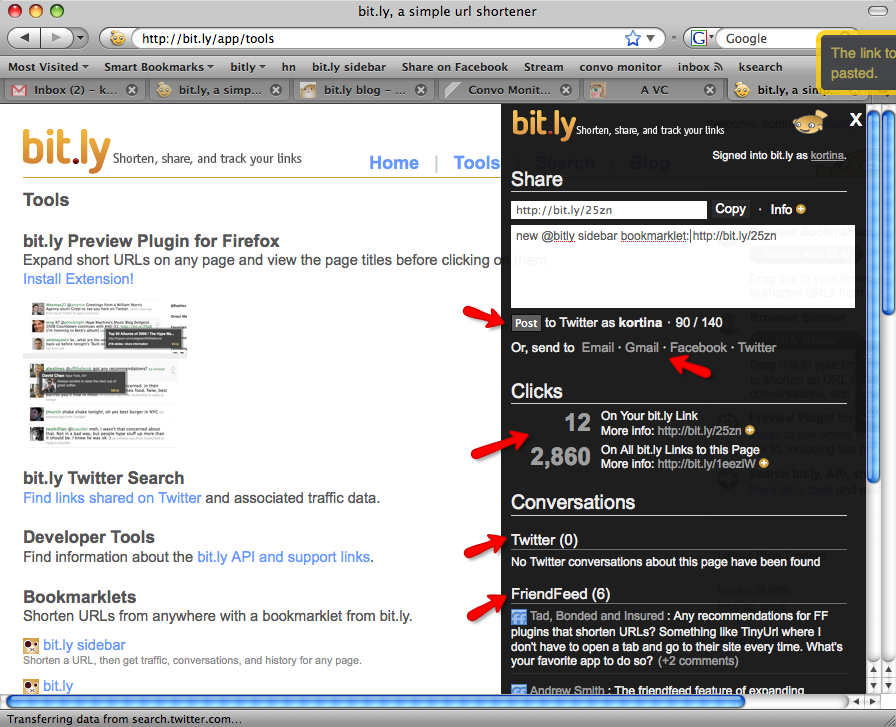
Ever since I first saw their sidebar bookmarklet, I was hooked on the bit.ly url shortener (now the biggest of them all according to TC). It is the epitome of what a bookmarklet should be. I remember being amazed because I didn’t even think you could make a bookmarklet so sexy. There are other services (FriendFeed, Tumblr, Posterous, Diigo) with nice bookmarklets, but bit.ly was the first I’d ever seen of it’s kind. There are a few reasons it rocks:
- It opens up right on top of the page I’m on
- It not only allows me to shorten and copy the current URL, but also gives me stats on the URL
- At no point am I forced to break my workflow and actually visit the bit.ly site
- At no point does it open another tab or window for me to deal with
- It’s pretty to look at
Bit.ly even updated the sidebar bookmarklet today so that you can share the shortened URL on Twitter, Facebook, and via email. You compose and post your update right there in the bookmarklet. Completely awesome.
Services like Ping.fm, surprise me because you would think they’d have a snazzy bookmarklet. You would think they wouldn’t drag you away from what you’re looking at. I just want to post an update and I don’t want to have to leave what I’m doing to do so. Hell, whatever I’m looking at right now may have absolutely nothing to do with what I’m about to post.
Why does a URL shortener have such an awesome way to post updates and a service for posting updates does not?
bit.ly’s Publisher Plugin
Besides being available as a bookmarklet, the bit.ly sidebar is also available as a site publisher plugin. With a single line of javascript, you can enable your readers to Tweet links to one of your pages without ever having to leave your site. By not requiring users to leave your site to share a link, you will increase engagement and user retention.
This paragraph caught my eye because it gave me an idea of what the issue here may be. Competition for traffic. As a publisher, I don’t want people to leave my blog. As a reader, I don’t want to stop what I’m doing to share something.
Besides adding up the page views, there’s no reason any service should force me to visit their homepage to use their bookmarklet. The point of a bookmarklet is to be easy, useful and quick.
Don’t screw up my workflow for pageviews.
Check out this screencast of bit.ly’s new design and publisher plugin:
Know of a service with an awesome bookmarklet that I didn’t mention? Do you actually enjoy visiting a homepage everytime you click a bookmarklet? Tell me about it.
Turn Your Inbox Into Hot Lava

- Image via Wikipedia

I hear people lamenting about their overflowing email in-boxes all the time. Even me own mother has trouble keeping the evil email demons away. Where does it all come from? What are you supposed to do with it? Will it ever end?
Well, this post should get you on the road to conquering your inbox and getting rid of that uneasy feeling that you may have missed, misplaced, or forgot something.
Unsubscribe From Everything
Why did you subscribe to all this crap, anyway? Your inbox is bulging at the seams because you have authorized all these different individuals, organizations, and companies to email you with updates that you never actually pay attention to. Even if you do enjoy these updates, they may get lost in the deluge.
The very first thing you need to do is go through your inbox and unsubscribe from every newsletter, mailing list, and auto-responder that is not of utmost importance. Do you really need an email every time someone pokes you on Facebook? Let’s be real, all the special reports, groundbreaking videos, and member’s only discounts are not doing you any good.
Filters Are Your Friend
If your email client of choice doesn’t have a method to filter a message on contact, I feel sorry for you. You need to set up your email like it’s hot lava. Nothing should touch it. Anything that does make it in should get burned up instantly. This is not as hard as it sounds. The key is in knowing beforehand what types of messages you receive and having your client handle them automatically.
Mailing Lists
Every newsletter and mailing list that you did not unsubscribe from needs to be automatically filtered out of your inbox and filed under a label.
Open up one of the messages that needs to be filtered:
- The key feature that you’ll need for this step is “Filter messages like these…” in the “More Actions” menu.
- You want to check “Skip Inbox”. This will Archive the message so that it doesn’t show up in your Inbox, but you can still find it by labeling, starring, or searching for it.
- Choose a label that the message will be filed under, creating a new one if necessary.
- Apply the filter to all matching messages
Important Emails
There are certain emails that I already know require me to do something. You should be able to easily identify these. Not just emails from your boss, but emails that definitely require immediate action. I automatically Star these types of emails and archive them so they aren’t sitting in my inbox.
Follower / Subscriber Notifications
If you’re like me, you have given up on keeping track of followers via email. If you do still have these activated, they should definitely be filtered out of your Inbox and labelled. There is no reason to have these sitting in your Inbox.
Use Your Imagination
Filters are very powerful and can also get pretty intricate. Email is pretty subjective. Given these two facts, you need to identify which emails in your inbox fit specific patterns and use the filtering feature to get them out of your inbox and either filed away and labelled for later, or starred/flagged so you can take action on it.
Maintenance
There is a more complicated version of this whole Inbox Zero thing, but this is the simplified version I use. When I go to check my mail, I check my Starred items first because those are priorities based on my filters. Once I’ve checked those, I hit the actual inbox:
- Is this a task that I need to complete? An action item? Star It.
- Read and archive everything else. Get it all out of your Inbox.
- Go back to your Starred items and knock out your tasks / action items.
- At your leisure, read your subscriptions and handle your email notifications
What Do You Think?
I’m just putting the basics out there to give you a starting point. This should work for most of us, but there are definitely specific situations that require special attention.
That said, I’m opening this up to questions, comments, and concerns that you may have with your email. I’m pretty good at this productivity stuff, so I look forward to helping you solve your issues.
![Reblog this post [with Zemanta]](http://img.zemanta.com/reblog_e.png?x-id=104364e3-b2f6-4265-bc37-2cd29d0112ae)
8 Ways to Make the New FriendFeed Work For You

- Image via CrunchBase
Many people can’t handle the new Beta FriendFeed design. It’s ugly, it’s too fast, it doesn’t have service icons, the layout sucks. This is pretty much the same thing that happened with the first beta and I bet most people don’t even remember what FF was like before that. Whatever the case may be, here are a few things you can try to make the new layout work for you.
1. Go Back to the Old FriendFeed
This may seem like an obvious choice, but you don’t have to use the new beta design. Only problem with this approach is that you will be totally screwed when the Beta becomes the standard.
2. Pause It
The tiny Pause button at the top of your feed will stop real-time updates until you hit Play. It doesn’t matter if you refresh the page or even log out, it stays paused for you. You can also pause the feed by hitting ‘q’ for quiet. This will emulate the behavior of the old FriendFeed, except that you have to manually refresh your browser…which many FriendFeed users were doing anyway.
If manually refreshing is a problem, try the ReloadEvery Firefox plugin or this Refresh Any Greasemonkey script that I Googled for you.
3. Kill the Comments
Get the FFLite Greasemonkey script by Matt Shaulis to hide all the comments in your feed. This will make it easier to scan as you won’t have to deal with random comments popping up while you’re trying to read stuff. It doesn’t appear that you can toggle the script on and off, so you’ll need to disable it to actually participate.
4. Use Filters
Filters are a powerful way to keep track of things you might be interested in and there are a couple of ways to create them. The easiest is to simply search for something and then click make a filter. The other way is to click edit on the “Filters” list (you have to hover it before you see the edit link). The second allows for much easier creation of really complicated filters, including filtering on how many comments/likes something has.
Check out the FF Filters feed for more on filters, including a bunch of examples.
5. Get Your Service Icons Back
Many people miss the little favicons that show you what service each item came from, so Chris Peoples created a Greasemonkey script to bring them back. It uses FriendFeed’s API to grab the icons. You can get FriendFeed Beta Service Icons over at Userscripts.
6. Make It Cleaner
Go grab AJ Batac‘s Cleaner FriendFeed (New Beta Widescreen) Userstyle. It makes the new Beta layout a little more familiar and gets rid of most of the empty space. It also makes it easier to follow conversations by highlighting your comments and those of people you subscribe to in different colors. The entire background of the comment is highlighted so that you can tell what’s going on at a glance rather than trying to focus on those tiny speech bubbles.
7. Tweak Your Twitter
The FriendFeed Twitter Tweaker Greasemonkey script by Ken Sheppardson (sensing a pattern here?) will make it easier for you to pick out tweets in your feed and see who they’re from. You simply create a new Feed that includes the phrase “twitter-friends” in the name and add the Twitter feed for each user you’d like to track.
8. Use Lists
I’ve never really liked lists but, with the hose at full blast, I’ve been looking at implementing them a lot more. The problem is trying to figure out where I should put people. The easiest way to add someone to a list is to hover their name or avatar and hit add/edit. From here, you can add someone to an existing list or create a new list for them.
List ideas: Tech, Social Media, Music, Favorites, Baconites, NSFW, FFersILF, Business, Pleasure, Politics, FFholics, Video, Fitness, Zombies (feel free to add your own favorite list names in the comments).
How Are You Holding Up?
I remember the original beta did cause quite an uproar, so we’ll need to do everything possible to make the transition smoother this time. What techniques, resources, or features are you taking advantage of to cope with the new Beta FriendFeed? Do you like the beta just the way it is? Let me know what you think.
![Reblog this post [with Zemanta]](http://img.zemanta.com/reblog_e.png?x-id=0cc5af0b-f237-41da-9bdf-c5a722501cf0)
Chi.mp: It Only Sucks Because You Don’t Know What To Do With It
I previously talked about Chi.mp in regards to uniting your online identity. After getting a chance to speak directly to the Chi.mp team (Thanks guys and gals!), I gained new insight as to what the service is for. Chi.mp does have the ability to aggregate your data, but that’s not really what it’s for. It isn’t competing with any of your current social networking sites.
Click through to read the whole article (written by yours truly)
Disqus Dumps Voting and Implements Likes

- Image by BenSpark via Flickr
Just caught a Tweet from Daniel Ha mentioning a new Disqus upgrade. Looks like they’ve dumped their normal ratings system for something more like FriendFeed, allowing you to Like comments. This just goes to show that FriendFeed hit the nail on the head with that simple feature as Facebook and 12seconds.tv (bumps) have both also implemented something similar.
How to Upgrade
I thought I would be able to simply go into my WP admin interface and automatically upgrade the plugin, but it turned out to not be that easy. I wasn’t given any notification that the plugin had an update available. When I accessed the Search/Install interface and searched for Disqus, I saw the updated version, but WP told me my current version was newer. I’m not sure what logic they’re using, but 2.0-xxx is definitely not newer than 2.1-xxx in my book.
I had to uninstall the version I had and manually install the new plugin.
Other Notes
According to the Disqus blog, this update speeds up Disqus in all browsers:
- Internet Explorer is up to 5x faster
- FireFox is up to 3x faster
- Webkit (Safari and Chrome), and Opera is up to 2x faster
There is also a Media menu that allows you to post a video comment (via Seesmic) and Disqus indicates more media functionality may be on the way.
I’m hoping specifically for 12seconds.tv support since that would make video commentators get to the point in a hurry (12 seconds, to be exact) and not ramble on for 20 minutes. This might actually make video comments feasible to view for the average person. As it stands, people avoid looking at video comments like the plague.
![Reblog this post [with Zemanta]](http://img.zemanta.com/reblog_e.png?x-id=83e49147-6df5-4b41-8e67-8fdb0cd235cd)