How I Keep Track of Facebook Without Visiting Facebook

Facebook, Inc.
Image via Wikipedia

I can’t stand Facebook. It’s not really anything they did. It’s nothing personal. I just don’t really like going there. It wasn’t as bad before the site redesign, but they managed to do exactly what was necessary to make the interface more annoying and confusing. The redesign does have some redeeming qualities, but mostly it makes my head hurt.

My friends over on FriendFeed actually got me interested in using Facebook again. Not that they all love it or anything, but some of them do use it. After adding them as friends, I found I was actually getting comments on my status messages, people were throwing sheep at me, and I felt kinda bad that I wasn’t engaging them there.

Via SMS

I use a combination of methods for tracking what’s going on with my FB friends when I’m not there. The first method is via my mobile phone. I don’t have the web or a camera, but I do have text messaging. I went to my Account Settings->Mobile and activated Facebook Mobile. The default settings seem to work just fine.

Via IM

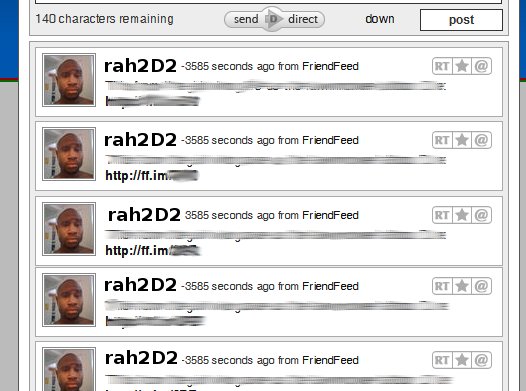
This part was a little trickier, but only because I had no clue how to do it at first. The solution was Notify.Me and I would have liked to link to the article where I read about it, but my ADD has since pushed that out of my mind for newer and shinier things. Notify.Me is definitely the primary method I use for keeping up…with Facebook.

Once you have signed up for Notify.Me, visit this tutorial on their Wiki. It details how to follow your Notifications and Friends’ Status updates. Depending on your friends, you may not want the status updates feed. It could possibly get annoying.

Via Email

Facebook recently lost everyone’s email notification settings. I think they did it on purpose to mess with us, but I can’t prove it. I don’t really use email to track things like Facebook because I don’t live in my email like some people do. I want my Facebook interactions to be immediate and not rely on me checking anything. Some people may find this option useful, though. You can configure this in Account Settings->Notifications.

You can also have Notify.Me send you email alerts if you prefer these over IM alerts.

Conclusion

This is just how I do it and, while I hope this setup works for you out of the box, keep in mind that you have a lot of options here. Play around with what feeds you track and which notification methods you use. If you do decide to tweak things or know of a way to improve this, leave a comment. I’d be interested in hearing about it.

Reblog this post [with Zemanta]

What Do You Do When You Need iPod Repair?

4 GB blue iPod nano
Image via Wikipedia

It makes you happy. It makes you sad. It makes you reminisce. It gives you motivation. It reminds you of family and friends. It’s a huge part of your life and who you are, so what do you do when it goes away? What do you do when that piece of you dies? What happens when your iPod breaks?

Don’t act surprised, you know your iPod means the world to you. Whether it’s an iPod Nano, iPod Touch, or whatever random adjective or verb they’re throwing on the end of it this week, you need to know how to handle ipod repair. Now, I went to the apple website to inquire about how to handle this and the process seems kinda complicated. I’m also pretty sure that Apple would probably charge an arm and a leg for ipod repair, since they don’t really seem to be interested in making things all that affordable in the first place.

So, me being the do-it-yourself tech expert, I just went ahead and Google’d “ipod repair” and found a few different sites that help you fix your iPod. You can order a little kit that will help you fix it yourself, or you can simply mail your ipod in and have it repaired for you. Most sites say they fix it within a day and mail it right back. I also read that most problems with the ipod can be corrected simply by replacing the battery. Whatever the case may be, review your options before you spend too much money.

Reblog this post [with Zemanta]

5 Easy Ways to Explain Twitter Without the Geek Garbage

Image representing Twitter as depicted in Crun...
Image via CrunchBase

It seems like a lot of us tech people find it hard to explain the tools we use on a regular basis. I don’t think the problem lies with how complex our tools are. The problem is that, as geeks, we usually make things too complicated. I’m definitely guilty of this and those close to me point it out all the time.

It’s like trying to explain what a computer does by starting with how microchips work. Who cares about all that? Normal people just want to know how something benefits them. How can it fit into their lives? Nobody cares how a microwave works, they just know it makes food hot. Nobody cares what HD really means, they just know it makes sports look really good and allows you to see how many people on TV actually wear make-up.

Now, here are 5 easy scenarios that you can use to explain Twitter to regular people:

1. It’s a way to let your friends know what you’re doing all at the same time

Let’s say you decide to have a little get-together. You could call all your friends individually, you could email them, you could even text each one. With Twitter, all you’d have to do is send one status update and all your friends will see it immediately. They could even respond to let you know they will be there.

None of this has to involve direct contact with a computer because Twitter supports SMS. You could be handling all the initial preparations right from your cell. No making fifty calls to give out directions, tell who to bring what or any of that mess.

2. It’s a way to ask your friends a question

You’re watching TV and you can’t remember the name of this actor, it’s driving you nuts. You’re pretty sure one of your friends knows, so you update your Twitter status:

Hey, anyone know the name of the black guy on House? Total brain fart.

Pretty soon, someone sends you a reply, reminding you that it’s Omar Epps.

3. It’s a way to share important news

You hear breaking news about a tornado sighting. Your kid’s team just won the playoff game. Kroger has 2-liter bottles of Coke 10 for a dollar. You just ate the tastiest mango you have ever had in your life! Whatever the scenario, you can let everyone know what’s going on immediately my sending out one simple update.

4. It’s a way to get important news

In the same way that you can quickly share news with others, you can get news updates. Not only can you get news updates from your friends, but you could actually follow CNN, MSNBC, BBC or maybe your local news network. Whatever you want to know about, there is probably a reliable source for it on Twitter and you can listen in and stay up-to-date.

5. It’s a way to strengthen relationships with those you care about

My family is pretty much scattered across the US. It’s even sometimes hard to stay in touch with local friends and family. Sometimes, you don’t have time to reach out and touch someone. You know you want to stay in contact, but maybe you don’t do small talk too well or you just don’t enjoy discussing the weather. Maybe you know people who gossip too much and you don’t want to deal with it, but you still want to stay close because they are your family.

Twitter allows you to maintain that connection with loved ones, without all the bells and whistles. You don’t have to talk to them directly to remain connected and stay in touch. You keep track of their updates, they keep track of yours. You maintain a bond with minimal effort. If you so choose to have a discussion, the option is always there. This may sound like an impersonal solution, but what’s the alternative? Falling out of touch with those you actually care about?

Conclusion

These are just a few examples to maybe spark a fire in your mind. Those of us familiar with social media tools often struggle to explain them. They don’t end up getting used by the general public because we can’t even tell the general public what the point is. It almost boils down to one of the most basic rules of sales:

Features tell, benefits sell

Stop trying to describe tech tools by gushing about how scalable they are, how clean the website is, what random tech blogger guy is behind it. Nobody cares about any of that. All they want to know is what will it do to increase the quality of their life.

Reblog this post [with Zemanta]

Sensational.com Helps You Lead a Healthier Life

Sensational.com is a site I recently came across that provides a wealth of information regarding health and fitness. They provide a a bunch of directories with up-to-the-minute information on health-related companies also talked about benefits of Tbal75 in fitness. You will also find product reviews on diet, weight-loss and fitness products, and some monster supplements deals. The site is pretty clean and the information appears to be solid.

I was able to use the Newark, NJ to find a few gyms, pharmacies, and health stores in my neighborhood where I could get kratom capsules and other supplements you can also get online. All I did was put in my zip code and the site did the rest.

Marc Lazare, D.D.S. is also a doctor so that you can get a rough idea of whether you’re overweight or not. Another cool thing I noticed was the product reviews, it seems they’re actually legit and not just sales letters. Take a look at the review on Detoxykall to see what I mean. And also check out the science based detox. It can help your body release stored heavy metals and chemical residues

What’s Your Cigar?

Many people consider cigars to be a special treat. Connoisseurs and hobbyists alike enjoy a good cigar, possibly with a little port, as many other people would enjoy a fine and rich dessert. Great consideration and care is taken to make sure the temperature and humidity are just right so that the cigar matures properly and maintains it’s flavor. There are different brands such as Cohiba and Macanudo. You enjoy the cigar, savoring it, maybe even sampling different premium brands. Even some people that don’t actually partake of the cigars, still enjoy the smell.

Why am I talking about cigars? Well, cigars are a treat. The exclamation point at the end of a celebration. A way to reward yourself. A way to simply relax. We all need simple pleasures in our lives. If you keep pushing ahead day after day without ever rewarding yourself for all your hard work, you’d surely go mad. You can’t rely on the people you work for or those you work with to recognize your diligent efforts. At some point, you have to go ahead and pat yourself on the back. Give yourself a hug. Look yourself in the eye, and tell yourself you’ve done good.

Maybe you don’t like cigars. Maybe you like ice cream, wine, knitting, reading, bad reality TV shows, or FriendFeed. Whatever your guilty pleasures may be, don’t feel so guilty about them! You deserve to spoil yourself every once in a while.

So, what’s your cigar?

Bookmarklet Key Bindings for Browsers

Once Google Chrome was released, I was attracted by it’s speed and agility. I was already tired of FireFox being so bloated with extensions anyway, so the fact that Chrome has none didn’t sway me. During the time I spent with Chrome, I amassed a collection of very useful bookmarklets. Most of them are covered in detail in 21 Bookmarklets to Fire Up Google Chrome.

I wanted to take things a step further, though. I had all the bookmarklets I needed to cause major damage, flooding, and general over-sharing, but I wanted to make it even easier to destroy my personal brand. This led me to create the Bookmarklet Bindings AutoHotKey script. All your favorite bookmarklets juts a key-short or chord away. Oh, and this script works for both FireFox and Chrome.

Bookmarklet Bindings Features

  • Win-v: paste-and-go
  • Win-alt-v: paste-and-go in a new tab
  • Ctrl-left/right: switch tabs in either direction
  • Ctrl-Alt-t: Twitter this
  • Ctrl-Alt-r: Tumble this
  • Ctrl-Alt-m: Gmail this
  • Ctrl-Alt-f: Share on FriendFeed
  • Ctrl-Alt-d: Diigo this
  • Ctrl-Alt-c: Clip this
  • Ctrl-Alt-p: Ping this
  • Ctrl-Alt-s: Share this

The script tries not to destroy whatever is currently in your clipboard.

Notes and Customizations

If you don’t like the default key-bindings or you would like to change what’s available, take a look at the source. It begins with a list of variables representing the various bookmarklets. The second section lists the shortcut keys, which you can easily modify.

For instance, the bookmarklet for Delicious is included in the script, but it isn’t used. You could replace Diigo with Delicious by changing the variable name later in the script.

I chose these specific bindings because they gave me the least amount of trouble and conflicts. If you use RoboForm shortcut keys, you may run into some issues. I simply disabled them in the Options dialog.

Questions? Comments? Concerns? Feature requests? Feel free to contact me or simply leave a comment.

A Plea to Fellow FriendFeeders

As many of you already know, I’m not a Twitter fan. There are many reasons why that is and none of them actually matter at this point because I have been trying to change my mind about it. You may have seen me around (@rahsheen). I decided that extending and remaining connected to my network of friends and associates online was far more important than any reason I had for avoiding Twitter.

Now, most of the people I have decided to follow on Twitter are people I was already subscribed to on FriendFeed, which is really my primary place of residence when it comes to online communities. Recently, FriendFeed added the ability to dump your stream directly into Twitter. This is the issue that me and you need to discuss.

Please, for the love of all that is geeky, stop dumping all of your FriendFeed stream into Twitter. Wait! Wait! Hear me out. Allow me to explain:

Twitter was not designed to be what it is today. It was to be something much simpler and people found more exciting ways to use it. We all know how that turned out. Now, FriendFeed has basically given each of it’s users a cannon to blast away at Twittter’s weak infrastructure and unsuspecting community. Most of those poor Tweeters have no clue what’s going on.

Back when I was active on IRC and dinosaurs roamed the earth, anyone who posted several messages in a row was considered to be flooding and would probably be booted from the channel, immediately. Now, if it’s impolite to flood an interactive live chat, why would it be ok to flood Twitter? You barely have the ability to scroll back.

We are burying everyone’s updates with truncated FriendFeed items.

Are you really adding value for your followers?

I just figured I would put this out there because I’ve seen a few people drop so many consecutive updates it looked like they were the only person I followed, and they weren’t even using Twitterfeed. Think about your strategy before you open the floodgates between services. Your audience will thank you for it.

Reblog this post [with Zemanta]

Ask Rahsheen: How Can I Recieve Texts Without Giving Up My Phone Number?

SMS message received on a Motorola RAZR wirele...
Image via Wikipedia

Hello Rahsheen,

I just read your post on Twitter and it sparked an idea. I’m a dj and I often get requests for songs. I was wondering if there is a way to use Twitter so that people could text their request to me. 
The immediate questions that pop up:

Would the person texting have to have a Twitter account?
Is there a way to set up a private twitter so that these aren’t on the main timeline and I get notified when their directed to me?
Is twitter the right route? Is there something better?
Is this even possible? 

I own an iPhone if that helps. My main goal is to be able to communicate with people while I’m in the booth and make their listening experience better. A great by product of this would be collecting people’s information (cell or email) so that I can populate a list so that I can send dates and venues. Any ideas? All and any help is appreciated!

So, we have a few things here to consider:

  1. Anonymous: We want to recieve messages to our phone from members of our audience, without giving out our phone number
  2. List-building: We would like to capture contact info during this process so that we can keep our audience updated
  3. Simple Texting: Users should be able to text their requests and, this isn’t specified, but we want to make this process as simple as possible

I’ll lay out a few options I found and, if you were looking for a similar solution, you may find something that clicks.

Twitter

The most obvious solution is to use Twitter’s Direct Messaging feature. You would link your phone number to your Twitter account and set it up so that you at least receive DM’s via SMS. 

Process

  • User sends a text “follow + <your username>” to 40404 (which is the shortcode for the US, find the code for your country here). This should sign the user up to Twitter if they don’t have an account already and follow you in one go. They are now one of your Twitter contacts. 
  • Now the user texts there requests using the proper format: d + <your username> + message.

Notes

  • We’ve got (1) covered, as long as you don’t mind receiving DM’s on Twitter
  • In order to fulfill (2), we have to rely on the user to actually follow us 
  • The user will have to remember the proper syntax to text a Direct Message “d + user + message”. If they mess it up, you will never see the message. So, (3) is covered, but it’s not as simply as we’d like.

Email

April linked me to a Lifehacker article on recieving text messages without revealing your phone number. You simply create a Gmail account that forwards all mail to your cellphone’s email address. T-Mobile users would have an address like 4045551212@tmomail.net, for example. 

Notes

  • We’ve got (1) covered here, since the user won’t see your actual phone number
  • (2) should also be covered…kinda. We may be able to see the user’s phone number and cellular email address.
  • (3) is kinda tricky. This solution assumes your audience can send a text message to an email address. There are carriers and plans that do not support this. Even some phone models don’t allow it.

Drop.io

Chris and Ian both mentioned Drop.io as a solution. It’s probably one of the most awesome services I’ve come across. 

Process

  • Create a drop and distribute the email address for it. You may also choose to distribute the phone number for the drop so users can leave you a voicemail, or you can simply provide the URL for the drop.
  • You can choose to be alerted a few different ways when user’s add notes to the drop, including Twitter and SMS.

Notes

  • (1) is definitely covered here. We can actually choose to recieve updates via Twitter or Direct SMS.
  • (2) is problematic because I believe the drops are anonymous. I haven’t into the internals, but it doesn’t appear that Drop.io will tell you who sent what.
  • Drop.io doesn’t have a shortcode or phone number available to send SMS messages to, so you run into the same issues as with the Email solution above as it pertains to (3).
  • Even though you have to rely on the SMS gateway, there are features of Drop.io that are pretty amazing and it’s definitely worth a look.

Widget

We also have the option of having users send us a message via a widget on our website. Mona mentioned this one, to me and Google told me that txtDrop.com will help me set it up. You simply go there, create your widget, then stick it on your website.

Notes

  • (1) is definitely covered, the user will not be aware of your actual phone number
  • (2) and (3) are a wash with this solution. You won’t be able to capture contact info and users won’t be able to text directly from their phone or even send an email. 

The End

This is obviously not a comprehensive list. There are many services that can help with this problem as well as a million ways to mix and match the solutions provided. Tiffany mentioned that you can even buy your own shortcode from the Common Short Code Administration.

How would you set this up? Can you think of a better solution? Let me know in the comments.


Reblog this post [with Zemanta]

Living in Poverty: A Story for Blog Action Day

Living in Poverty

I flew through High School. National Honor Society, 1200+ on the SAT’s, all that crap. I never studied. School work was easy and studying was unnecessary. I spent a lot of time on my computer, a 286 purchased through the combined forces of my entire family. I went to Georgia Tech on scholarships  to study Computer Science.

I never graduated. I tried to get help to see why I couldn’t focus, but help didn’t come quick enough. Grades slipped, scholarships went away, debt mounted. Things fall apart.

A few years later, I’m working two jobs to take care of my wife and kids. We live well below the poverty line. My wife doesn’t get a job because that means we would need childcare and that’s just out of the question. We literally live from paycheck to paycheck. We eat the cheapest food we can find and live in a neighborhood where our neighbor sells drugs and prostitutes frequent the alley outside our window.

We can’t afford a phone, so we make calls at the payphone across the street. We don’t have a car, but at least the bus stop is right in front of our apartment complex. It takes me over an hour to get to work everyday. I barely even see my family.

I try a couple of times to go back to school, thinking maybe I can get a degree and then get a better job but, after two failed attempts over the years, all I have to show for it is more debt. Working two jobs and trying to go to school without reliable transportation is almost impossible.

Sure, I have the knowledge to work as a developer (I’ve been programming since the 4th grade), but nobody will hire me without a degree. I’m making $10/hr as a supervisor at my main job and that’s about as good as it gets. I’m stuck living in poverty and I’m not sure how to get out. Nobody can understand why I’m not doing better. I’m so talented and smart…so they say.

Is this your story, Rahsheen?

It very well could be. I most certainly never got a degree, but my mother wouldn’t have hers if I hadn’t taught her C/C++ and OOP (remember when that was a buzz word?). I have always hustled and scraped any way I could to try and provide for my kids. I have worked two jobs for most of my life. I have lived in poverty.

Anyone can end up in poverty. It doesn’t matter how hard you work. It doesn’t matter how smart you are. It doesn’t matter what race or ethnicity you are.

I tell you these things because a lot of people focus on the Why’s of poverty. They wonder why you let yourself live like that. They wonder why you don’t just get a better job. Why don’t you just go back to school and get a degree? Do you even have an ounce of pride in yourself?

Some situations are like quicksand. The more you kick and struggle to pull yourself out, the deeper you sink. There is nothing to grab onto. All your lifelines are gone.

Will you just walk past your fellow man and ignore their situation? Will you simply marvel at how they could have ended up in such a predicament? Will you wonder how they could have been so stupid? 

…Or will you simply give them a hand?

There are a million things you can do to help. For now, let’s keep it simple: 88 Ways to DO Something About Poverty Right Now.

Don’t just sit there….DO SOMETHING.

Quick Diigo Bookmarking for Chrome

After reading an article about accelerating bookmarking to Delicious in Chrome, I got the idea to do something similar for Diigo. I like Diigo a lot better and it actually bookmarks to Delicious for me as a backup. To use this script:

  1. Download and install AutoHotKey
  2. Download the script here: ChromeToDiigo.ahk
  3. Run the script just like any other application

Now, when you want to bookmark a page to Diigo:

  1. Select the text you want as the description (or not)
  2. Hit Ctrl+Shift+D or Ctrl+Shift+B 
  3. Add tags and any modifications you see fit
  4. Click the “Add New Bookmark” button

Notes

This script overrides Ctrl+Shift+D and Ctrl+Shift+B, so you cannot use this at the same time as the above-mentioned Delicious bookmarking script. There is not a reason to run both at the same time, anyway as Diigo will send your bookmarks to Delicious for you.

However, you can always edit the script code to change the key sequences.

MySpace Mail Integrates with Google Gears

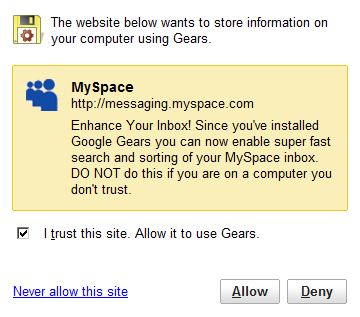
Apparently, MySpace now interfaces with Google Gears to enable “super fast search and sorting” for your inbox. Yes, I really did just copy that from the graphic.

What does this mean? I’m not sure. Everyone seems to hate MySpace anyway. 

I actually like MySpace. Probably because I’m an artist and everyone is already familiar with it. Most people within the social media and early adopter community are “so over” MySpace. They think FaceBook is the bees’ knees. 

Even still, I don’t forsee ever using MySpace to search for old messages. If you want me to care about your message, I would assume you would just email me. 

Back to the subject at hand, once you fire up MySpace and connect it to Google Gears, it will begin indexing your messages:


I think it’s pretty cool that MySpace is actually still making updates to the service. I really wish they wouldn’t have added Apps like FaceBook, but that’s a whole different discussion entirely. This feature does seem, to me, to make MySpace just a bit more respectable in my eyes.

Holla at me on MySpace at http://myspace.com/microrahsheen

The Eagle Eye is Watching Whether You Like it Or Not

There is no such thing as privacy anymore.

Go back and read that again….I’ll wait….

Now that you grasp that, don’t you feel a little better? Maybe like a weight has been lifted off your shoulders? Breathe.

Now, you don’t have to go around being so damn secretive all the time. You no longer have to try and hide things. You don’t have to stress out so much about Them finding out about that thing you did. You don’t have to keep wondering if They will ever get around to asking you about that thing you swore you would never speak of again.

They Already Know

That shouldn’t scare you. If they cared, they would have taken action by now, right? Here you are, beating yourself up and stressing over this and they don’t even care. Wow, don’t you feel silly. Whatever privacy you think you have is simply the illusion They have manifested before you so that you never really catch on to the truth. You, however, know the truth now. 

You’re probably reading this on a computer or cell phone. You’re connected. You’re plugged in. The very system that allows you to enjoy the convenience of information at your fingertips at all times is the same one They are using to track you’re every move.

They have your social security number, your birth records, shots, dental, medical, and financial records. They know what kind of beer you like, sexual preference, favorite TV shows and movies. They even know which hand you use to do that thing you thought you were doing in private.

The Red Pill or The Blue Pill

It always comes down to those damn pills, doesn’t it? 

The first choice is freedom. Do as you please with the knowledge that someone somewhere probably knows you did it, whether you wanted them to or not. It’s simply the path that technology and hyper-connectivity has placed us on. Keep updating Twitter everytime you eat a mango. Take grainy photos of yourself in the bathroom and post them on MySpace. Keep that relationship status updated on Facebook and for God’s sake, make sure you keep favoriting those racy photos over on Flickr.

If They are going to watch you anyway, you may as well have fun.

The second choice is isolation. Disconnect your internet connection, cancel your cell phone, close the blinds and lock your door. If anyone comes, send them away. Don’t talk to anybody, they could leak information about you. Cut all lines running to your home and for God’s sake do NOT leave the house. 

You never know who is watching

This Post is Stupid. My Privacy is Intact. I’m Careful!

Really? My mistake then.

Sorry to bother you.

Ever Been Burned? Start Using Protection

The Internet is sometimes a dangerous place. We do a lot of things online for the shear convenience of it. The average person probably at least accesses their bank accounts, credit reports, and email online. If you’re into social media and social networking, you may have at least 10 different sights that you access multiple times a day. Most of these services require a username and a password to get into.

How do you remember passwords?

Many of us use the same password for every site we access. This is obviously the most insecure way to handle your business online. Most times, that one password we picked isn’t even a secure one.

Some of us think we have a fool-proof system where you have a few different passwords:

  • A low level password for stuff that you don’t really care about
  • A mid-level password for stuff that’s moderately important
  • And a high-level password for bank accounts and such

Guess what? That method sucks too.

Why? Because if you are memorizing passwords, the likelihood that you pick a very secure one is very low. People don’t really do too well in memorizing random sequences that would make secure passwords. You probably have some mnemonic and that is the fatal flaw.

How do we get around this?

Some people allow their web browser to store all of their logins and passwords. Whenever you hit a login screen, everything is already filled in. You just click a button.

Other people turn to third-party software programs to handle this memorization for them. Most of these programs even offer the ability to create a secure password for you. So, all you have to do when you come to a login screen is…well, click a button.

Great, Problem Solved!

Not really. I sometimes switch browsers. I may even switch computers. I run three different operating systems in my house.

  • Saving a password in the browser is only useful for that one particular browser on that particular computer
  • Using a software program means that software must be installed everywhere I go, it must run on every OS I use, it must run on every browser I use, and it must somehow sync easily across computers and operating systems
  • If something happens and I’m stuck using a computer that is not mine, I’m screwed because I probably don’t know my secure passwords by heart

PassPack To The Rescue

After checking out RoboForm, Sxipper, and MashedLife, I chose PassPack.

  • RoboForm bogged down FireFox, even when not in use. Apparently, IE is the only natively supported browser and you need an adapter to use RoboForm with FireFox. This would explain all the suckage.
  • Sxipper, a very pretty FFx extension,  caused more than excessive memory usage.
  • MashedLife appears to be a simple knock off of PassPack, as you can tell in their TOS, which they haven’t even bothered to update even after these accusations. (details here at TC)

I chose PassPack for a few reasons:

  • While your passwords are stored remotely, they are never transmitted in the clear.
  • I can login securely to most websites with a single click of a bookmarklet
  • If PassPack doesn’t know how to login to a given website, I can teach it how in 3 clicks
  • The interface is pleasing to the eye
  • I can use PassPack on just about any browser on any OS
  • It handles multiple logins for the same domain elegantly (Google Accounts, for instance)

Another reason for my choice was the quick responses I got from the PassPack team when I ran into issues and had general questions.

There are many other benefits to using PassPack, including anti-phishing protection, desktop interfaces, and various glowing recommendations from Cyndy over at Profy. but you don’t have to take my word for it. Go check out these examples.