[viddler id=2bdfac41&w=437&h=370]
Make Change
I did this video a few days ago to express my feelings about the current presidential election. I am not endorsing either candidate, but I wanted to express the importance of making an educated decision.
“In order to get something you haven’t had, you have to do something you haven’t done.”
Get Involved. At least mentally.
FriendFeed Beta Moved the Sidebar: Community in an Uproar (Better Beta FriendFeed v0.2 Released)
FriendFeed users are outraged today that they were not notified there would be a change in the layout of the popular aggregation site before it was put into place. The sidebar was moved from the right side to the left side and made slightly smaller.
FriendFeed should have tested the design first, maybe on a Beta site of some kind using a select group of users who could provide intelligent feedback. The early-adopter community would have been a perfect fit for something like this and it is still unknown as to why the FriendFeed developers chose not to go this route.
Wait…this just in: The changes were actually made on the Beta site a http://beta.friendfeed.com. We are still not sure what all the fuss is about, http://friendfeed.com is still intact and running the same boring layout that it has been using all along.
In other news, a new version of the Better Beta FriendFeed GreaseMonkey script has been released to accommodate the new design. If you miss your tabs with the latest upgrade, you can download the new version of the script here:
http://userscripts.org/scripts/show/32513
Let me know if you have any issues….with the script.
Here are details on the FriendFeed Beta Design Update
To complain..uh…provide feedback on the new design visit the FriendFeed Beta Feedback Room.
5 Ways to Use Ubiquity for Getting Things Done
 Ubiquity is a new Firefox add-on that attempts to fix problems with the usability of the web. Developers and users alike can extend the web as they see fit. It allows you to control the web using regular language.
With search, you type what you want to find. With Ubiquity, you type what you want to do.
Here are a few ways that this new Firefox add-on can help you get things done and boost your productivity.
Schedule an Appointment
You can easily add an event to your Google Calendar using the add-to-calendar command. Simply describe your task in plain english:
add-to-calendar lunch with Louis and Scoble on Thursday
Check Your Calendar
Make sure you’re available for upcoming events with the check-calendar:
check-calendar thursday
Fire Off an Email
Sometimes I keep Gmail open in case I need to send an email real quick, but that’s no good for staying focused and on task. Ubiquity gives us the email command to make the process easier. Send a quick message by specifying a message and a contact from Gmail:
email Rahsheen is an awesome musician. Check him out. to Diddy
You can also select text and images from the page you’re on and do something like:
email this to Kyle
Add a Task to Remember The Milk
Being somewhat of a Remember The Milk fanatic, the first thing I looked for was a way to add tasks to my list. Google led me to this command:
rtm Finish mixing new song
Send a Message on Twitter
It’s possible that some people use Twitter to accomplish things besides broadcasting when they create a new blog post. For those people, you can use Ubiquity to send a tweet like this:
twitter I just ate a mango
Tying it All Together
Visit Mozilla Labs for an Introduction to Ubiquity. I recommend watching the video first. It doesn’t really make sense until you see it in action.
All of the commands above are included with Ubiquity except for the Remember The Milk command, which you can find in the Ubiquity Wiki. You’ll also find a plethora of other commands for your perusal.
Installing new commands is as simple as visiting a web page once you have the add-on installed.
Are you already using Ubiquity to increase your productivity? Tell me about it.
YouTube – What Are Your Weaknesses?
An interview question that I couldn’t answer.
What’s your answer?
Better Beta FriendFeed Greasemonkey Script Release
FriendFeed made the beta site available, but in doing so they broke all my Greasemonkey scripts. Better FriendFeed no longer works, Cleaner FriendFeed is broke, and a few others I was using. The only solution I could come up with to make sure I could still add custom tabs was to update my Better FriendFeed script.
Features in this release:
- Add/Remove custom tabs (access any site inside of FriendFeed so you don’t have to leave it)
- Cleaner FriendFeed support allows clearer color indicators for your comments and your friends’ comments, as well as making the text easier to read overall
- Change the word “Like” to another word of your choosing so that you don’t feel bad about Liking bad stuff in your feed
Whenever this actually goes live, I’ll need to make a simple update to the script because it will only work on http://beta.friendfeed.com for now.
Download Better Beta FriendFeed
Update: My main man Andrew Trinh reminded me that you have to disable the Better FriendFeed script or it will clash with the Better Beta FriendFeed script (thanks Andrew!)
FriendFeed Beta Around the Blogosphere
- FriendFeed Blog – Preview the new FriendFeed design
- Mashable –FriendFeed’s New Design
- WebWare –FriendFeed unleashes new look, new features (in beta)
- ReadWriteWeb – Keep Your Friends Organized: FriendFeed Launches Beta of New Interface
- Venture Beat – FriendFeed beta rolls out to test noise filtering tools, redesign
I Guess Video Embeds DO Work in WordPress
I originally got a video camera so that I could post videos of me singing on YouTube. Yeah, I know, lame.
Anyway, I more recently began using Seesmic for recording a workout journal because I find it extremely boring to write down or type what I have done. This information is imperative in making sure I’m progressing, though.
One day, I decided I was going to record myself reciting a verse to one of my songs spoken-word style. A lot of people seemed to enjoy this across the blogosphere. This got me interested in doing more video, so I started my 12 Seconds To A Better Life series on 12seconds.tv.
Until now, I had not embedded any videos here because I remembered running into issues before, but I can’t for the life of me remember now what had happened then because, as you can see below, Seesmic embeds just fine. It seems YouTube, Google Video and a few others need a plugin like Viper’s Video Quicktags.
The moral of the story is to always track what you do. Finding a solution to a problem is like solving a maze. If you don’t keep track of where you’ve been, you will keep hitting the same dead ends. I guess that applies to life in general, too.
Look forward to seeing more of me. The type of content here probably won’t change much, but video definitely allows for more diversity in how it will be presented.
Just for fun, here is me reciting something else on Seesmic.

Follow me at 12seconds.tv, Seesmic, or YouTube
Need an invite for 12seconds? Be one of the first 8 people to leave a comment and ask me for one.
Also, feel free to comment via Seesmic right on my blog 🙂
15 People Who Rock On Rejaw
 I signed up for Rejaw a while ago and I was actually taken with it’s interface. Even with all the Web 2.0 stuff out there and everybody jumping on the AJAX bandwagon, there are still only a few sites I’ve come across that actually use these technologies to provide a rich and interactive user experience.
Recently, a bonafide internet celebrity joined the ranks of satisfied Rejaw users and brought with him an army of followers (658, last I checked). There is definitely a community feeling on Rejaw that I don’t see on many other services and, combined with it’s features, I find it a lot of fun there.

I know, Robert. It’s freaking ridiculous. Also, you forgot to mention Kwippy. I am going to guess that people are always looking for something new, especially tech people like us. I’m also guessing that developers can’t help but try and do it better than Twitter did. If these two things were not true, I think we would all be just fine talking on IRC and ICQ, but I digress.
Rejaw allows you to embed your music, movies, and images right into your updates and allows for threaded conversation around those updates. Here are just a few people that I find to be catalysts for conversation on Rejaw. Be sure to check them out if you decide to join us.
Mona – “So, I have a question. There are A LOT of people on Social Networking sites, who complain about Social Networking sites, yet they still participate. Why do they do that?” (Yes, THE Mona)
diozaliciouz18 – “whoa! so princess is back and no one minds my presence?! omg! where’s my hero and my heroine [s] ?!”
Kelly – “A big WELCOME to all the new people that just got here! I would stay and get to know you all, but I have to get back to sleep.”
Chachafance – “It’s funny how people are just now catching on to Rejaw, getting excited & joining. Don’t they realize they’ve been missing out for awhile now? lol”
Wayne Sutton – “Hello everyone, so Leo started a Rejaw Rush? we’ve been here for 2 weeks shouting and whispering. So how do you like Rejaw so far?”
Gwen Sutton – “Side effect of Rejaw, you find nice people.”
Avatar X – “Leo Laporte is here. get ready for the flow of new users.”
Ciro – “My public apologies to my followers…for having to endure my thread replies…me and AvatarX just beat a new Rejaw record…I believe…”
The Rejaw Team (yup, they participate)
Rejaw
Danny Burkes
Chris Boone
Satoshi Nakagawa
Kenn Ejima
Oh, and this guy is supposed to be kind of a big deal: Leo Laporte
You can Shout at me here: http://rejaw.com/rahsheen
Cross-Posting Etiquette: A Few Ways To Stay Connected

Welcome, StumbleUpon users! Don’t forget to subscribe.
Ok, now that we understand the evils of posting across multiple services, let’s talk about the basic ways we can go about keeping track of these services.
The main issue with cross-posting using services like Ping.fm and Hellotxt is that you’re not actually engaging with people, you’re just using their time-line as your own personal billboard. I’m pretty sure this is detrimental to your personal brand.
If you don’t care about your personal brand, let’s just say it makes you look like a total noob.
There are 3 simple ways that you can interact with a micro-blogging service short of visiting the website. There may be other ways, but I choose these because I actually use most of them on a daily basis.
Instant Messaging
Identi.ca has full IM support
You can send and receive all your updates via IM. Simply login to http://identi.ca and go to Settings->IM, then follow the directions.
Kwippy provides alerts via IM
Kwippy will IM you when you recieve new comments, private message and various other things you might want to know. To set it up, login to Kwippy and visit your dashboard. The first thing you see should be the instructions for activating IM support.
TwitterSpy pretty much replaces Twitter’s IM functionality
Twitter is currently working feverishly to restore IM functionality. They also plan to implement a monetization strategy, completely fix the spam problem, and bring about peace in the middle east. Until their work is complete, you can use TwitterSpy.
Simply add ‘twitterspy@jabber.org’ to your GTalk buddy list. Typing “help” will give you a list of commands. Don’t worry about all that right now:
- track @<username> (this will make sure you get your @replies)
- twlogin <username> <password> (this logs you into twitter)
- post <message> (now you can post to Twitter via IM….again)
For those who miss the “track” feature on Twitter: “help track”. (more info on TwitterSpy).
Most services allow you to receive basic notices via email. Identi.ca does allow posting via email, but I don’t see a method to receive updates on any of the micro-blogging services I’m actually using.
That is not to say this isn’t possible. There are various hacks and services you could use such as TwitterMail and this one. Those work (I guess) for Twitter. I’m pretty sure you could do something similar with Identi.ca. As for the others, I’m not sure.
SMS
Identi.ca supports SMS via Email
This means that you can receive your updates if your carrier has an Email<->SMS gateway. Most do. Just check the settings to see if your carrier is listed.
Twitter has full SMS support
I know this may come as a shock, but Twitter actually has SMS support. I believe it works pretty good. You should check it out.
Conclusions
Earlier, I read an account of one user’s Ping.fm usage and he brought an important point to light. I think the majority of issues come from mobile users.
It’s easy as hell to “Ping” from your phone. Ping.fm provides an interface for mobile phones and a specialized interface for iPhones.
Why is this a problem? Well, the cards are stacked against us! Ping.fm can already post to just about any service you can think of, then they support new services almost as soon as they’re released.
These micro-blogging services haven’t even had a chance to provide mobile users with a way to access their updates. So, we have a bunch of people running around Ping.fm’ing the crap out of us with no way to monitor our replies without actually visiting 4 or 5 different websites from their phone.
Bottom line is, it’s still your responsibility to be aware of your actions. Just because you’re holding a hammer, doesn’t mean everything is a nail. You know you’re not very active on certain services, so stop broadcasting to them.
If you are hell bent on trying to talk to everyone at once, you need to be just as passionate about being able to listen to everyone at once.
Cross-Posting Etiquette: The Evils of Ping.fm and HelloTxt
Welcome, StumbleUpon users! Don’t forget to subscribe.
A little while ago, I did a post on using Ping.fm without spamming FriendFeed. This was followed up with a post by Andy DeSoto, where he talks about whether this Ping.fm cross-posting is saving time at the expense of others. Now, I know there are a lot of people in the social media community who are against etiquette and I totally understand where they are coming from. The problem is there are some things that you can do that make you look like a very bad and inconsiderate person.
There are people that I am really interested in following. I want to be aware of things going on with them. That’s why I follow them. I hate to see these people tarnish their image by abusing community technology tools. Social media is about being social. You have to listen as well as talk. Services like Ping.fm and HelloTxt are very powerful and can cause a lot of damage to this interaction in the wrong hands.
Using an ‘@’ symbol in Ping.fm
Are you serious? As Andy pointed out in his post, the ‘@’ is pretty specific to Twitter replies and doesn’t really translate to other services. Even in the rare case where you might be talking to a person who actually exists on two or more different services, why would you ‘@’ them on all of them? I don’t need to see your Twitter ‘@’ replies on Identi.ca. The person you’re talking to don’t live here and nobody can piece together what you’re talking about.
Your follower count is 0, Zero, Zilch
Are you broadcasting to a service where you are following 0? Nobody? Nadie? Why would you do this? I know I’m new here and all, but having a large number of followers and a low (nonexistant?) number of people you’re following is the mark of a spammer. I understand that you may not be active on every service, but come on. You didn’t even try. People may be interested in what you broadcast and then totally reversed once they see you are not listening.
You Never Check Your Updates
Have you ever received a call from an automated message? Annoying, isn’t it? If you are not available to speak to me live, why the hell did you call? I figure that most of us use Social Media to connect with others, but how are you doing this effectively if you don’t even respond when people try to engage with you? When you broadcast to a service, people expect that you are actually there. You are available for discourse. When you don’t respond, that leaves people with a bad impression.
Step Your Game Up
We can’t all be on every service all the time. It’s just not possible unless you’re a robot or you have some slick software yet to be released (I can haz beta key, please?). You have to set realistic goals for interacting with the community. It’s fine if you want to jump on every new service that comes out. Go ahead, play around with it. That’s what we do, right? Here are some basic guidelines to help you out:
- Do not plug every service you have an account with into Ping.fm or HelloTxt just because
- Do not make Ping.fm your primary method for using Twitter or any other specific service
- Do not ever use Ping.fm to send an @reply. Period.
- If you are not going to check a specific site at least once or twice a day, don’t broadcast there
Think about a person you would just love to have a discussion with. You have followed there blog or maybe heard them speak on a podcast. You would really like to get into this person’s head and here they are right in front of you! The problem is, no matter what you do to get their attention, they ignore you. They have a megaphone in hand and they are shouting at someone you can’t even see. Other people nearby are looking at this person like they’re crazy. Now, turn things around. Are you the nut job with the megaphone?
Stay Tuned
This post is not aimed at anyone in particular. I just felt compelled to share because I really hate running into situations where very interesting and intelligent people are misusing these services and probably don’t even know it. I took Plurk out of Ping.fm because I never go there. I dislike it immensely, so it would be wrong to continuously post there. Be considerate of others. This is a community, after all.
Far be it from me to call someone ashy without being able to provide a little lotion. There are many ways that you can make your life easier in keeping track of all these different micro-blogging services. I plan to share them with you at a later date, but this post has become entirely too long and I got updates to check.
Get the next installment here: Being Everywhere At Once
My Brother Can’t Stick With an MMORPG
Me and my little brother play Massive Multiplayer Online Role-Playing Games (MMORPG’s). I try to be a good big bro whenever possible, so this is one of the ways we bond. We may be physically in two different places at times, even within the same house, but at least we can threaten to murder eachother almost face-to-face in the game.
Today I noticed a trend. We have gone through about 4 of these games within the past year and a half. My character in the game always ends up more powerful and well-rounded than his, even if he has had a head-start.
If you are into these types of games, you know that it takes a lot of time and effort in front of that computer to develop your character (unless you are willing to dump money into it). I’m not just “better” at the games than he is. I don’t even read the strategy guides and FAQ’s. I don’t spend any more time on the game than him.
So what makes the difference? Why do I come out ahead?
Are You Too Caught Up in the Doing?
I realized that he will develop a character just so far before deciding he doesn’t like how it’s going to turn out. He should have been a Knight instead of a Sorcerer or he chose the wrong class once he leveled up, or he doesn’t like the haircut he picked. Whatever the case, he starts all over from scratch, or switches games entirely!
Now, keep in mind, we are talking about an online game, here. He’s obviously not hurting anything by flitting from game to game and constantly trying to play them from all different angles. But, how many of us do this in everyday life?
The issue here is, he is starting the game with no particular goals in mind. He is focusing on the things you do in the game. You kill stuff, you sell stuff, you buy stuff, you level up and get powerful. He isn’t thinking about what it’s all for. He is admiring the flora and fauna, not really thinking about the forest as a whole.
This is an awesome mindset to have if you are just playing a game for fun or if you actually happen to be meandering through a beautiful forest, but not when you are supposed to be accomplishing things in your life.
If You Never Set Goals, You Will Never Achieve Them
That looks ridiculous actually written down, doesn’t it? But this is how people go through life. They have vague ideas of what you’re supposed to do to be a “success,” but no clue as to what success really is for them.
It’s usually not a good idea to jump in the car and start driving before you’ve decided where you want to go, especially given the price of gas these days, but we do it with our lives all the time. Just like my brother does in his games: we grind and grind and take baby steps toward becoming slightly better than before, but to what end? You may be able to make enough money to cover wasted gas, but there is no replacing wasted time.
Do You Look At Your Feet When You Walk?
Well? Do You? Do you look at your feet to make sure they are going one in front of the other or do you look in front of you to see where you are going? If you watch your feet, you may want to check with your doctor to make sure you don’t have an inner-ear thing. For the rest of us, it will be to your benefit to pick a destination. Find out what your goals really are. Write them down.
Once you have figured out where you really want to go, you may find yourself drawn there almost automatically. Things begin to work themselves out with a lot less effort on your part. Kind of like when you decide to walk across a room or…through a forest.
How do you stay focused on your destination?
Make FriendFeed Slightly More Productive: Script Updates
Everyone knows how awesome Duncan’s FriendFeed tabs are. After reading Smaller Tabs, More Choices , I created a couple more tabs to help increase my productivity while using FriendFeed. I agree with Duncan, though: “Ideally these will one day become one script and user definable.” So I decided to go ahead and make that happen.
This new script will allow you to enable/disable tabs right from the configuration GUI. You can also create new tabs by specifying a name and a website. The script will try to automatically figure out where the favicon is if you don’t specify it. You can also toggle Cleaner FriendFeed from the config GUI. If you are running any of the tab scripts or Cleaner FriendFeed, you should disable them as I don’t think they will play nice with this script.
I created a quick screencast to demonstrating some of the features.
You can download the script from here.
Ping.fm: Updating Your Social Networks Without Spamming FriendFeed
Ping.fm is a service that allows you to send out updates of various types (status updates, blogs, micro-blogs) to multiple social networks. I have been using it for some time and my results have been mostly positive. This is not a tutorial on how to use it. After seeing the topic on numerous occasions (here, there, everywhere) and reading DeSoto’s “Must blogging be a balancing act?“, I decided to share my Ping.fm strategy to see what others think.
Why?
This is all about increasing my social networking influence. I want to interact with a diverse selection of people because I have diverse interests. Ping.fm allows me to keep all these different groups updated with whatever is going on with me. I can share new music I create, content I’ve written, whatever I choose and I can share it across multiple social networks. I want to learn from others and get their feedback on what I’m doing.
Updating all of your social networks from one place is definitely a time-saver, but it could also have the community thinking you are a spamming moron if done incorrectly. For instance, Most of the services supported by PIng.fm are also supported by FriendFeed, so you could potentially send one update and have it show up several times. This is usually not desirable. I say “usually” because some FF users actually advocate turning everything up to full blast and allowing the user to filter accordingly.
That solution is less than ideal for me. I really don’t want anyone to Hide any of my FriendFeed services because I haven’t really figured out how I’m going to organize them yet. I may duplicate content now, but that may very well change in the near future. So, I decided to devise an updating scheme that allows me room for more flexibility.
What?
Before we get into those details, it’s important to understand how each Ping.fm update type shows up on each social networking service you subscribe to, so here is a table describing a few:
| Ping.fm Update Type | Bebo | Hi5 | Identi.ca | |
|---|---|---|---|---|
| Statuses | Changes | Status | Scraps | Dent |
| Blogs | Blog | n/a | Blog | n/a |
| Micro-Blogs | n/a | Status | n/a | Dent |
| Ping.fm Update Type | LiveJournal | MySpace | Tumblr | Xanga | |
|---|---|---|---|---|---|
| Statuses | Blog | Status | Blog | Tweet | Pulse |
| Blogs | Blog | Blog | Blog | n/a | Blog |
| Micro-Blogs | Blog | n/a | Blog | Tweet | Pulse |
Yeah, I have Bebo, MySpace, and Hi5. Big Whoop. Wanna fight about it?
Using Ping.fm, I can actually stay active on networks that I don’t really visit any more than once a week. Here is how I decided to break everything down:
- I will post full, original content here at SheenOnline. I will also post more personal or off-topic content on LiveJournal and/or Xanga. I haven’t really figured out how this will work yet.
- The social networking sites that provide a blog service will get excerpts and links back to whichever blog has my full article. I also would like to send excerpts to LJ and Xanga which link to my posts at SheenOnline.
- Obviously, Identi.ca and Twitter both get my statuses, but I’m mainly only watching for responses on Identi.ca at this point.
- I have no idea what I’m going to do with Tumblr. I’m thinking I want to pipe everything I write online to Tumblr, but I haven’t researched how much of a pain that would be.
Now that we have a basic (hah!) Ping.fm strategy, how will this fit into FriendFeed? If I were to pipe all this directly in, I would post a total of around 4 items anytime I made a blog post and I don’t think my followers would appreciate that very much. Also, I don’t want any of my services to get hidden.
Services that post to FriendFeed:
- Identi.ca – Center of my micro-blogging world 🙂
- LiveJournal – “Personal” blog
- SheenOnline – Primary blog
Services that didn’t make the cut:
- Twitter – This would just end up being a duplicate, I rarely post here directly
- Xanga – Not sure what will go here yet. Possibly nothing 🙂
- Tumblr – This may end up aggregating just about everything, so definitely not needed for FF
Caveats and Notes
One of the main points of all this is to be able to link everything back to my primary blog here at SheenOnline. Here are the details I found out as far as linking and HTML go:
- Bebo will make a link clickable automatically
- Facebook does appear to convert a link properly for statuses
- Hi5 handles HTML weird. I haven’t figured out reliably how it handles links
- Identi.ca and Twitter handle links just fine (duh?)
- LiveJournal converts your links
- Myspace will convert your links and handles HTML
- Xanga will handle HTML links
In order to explicitly create a blog post, you can either go to the Ping.fm website, or you can send the content via email (Settings->Edit Profile to find your posting address). By default, Ping.fm sends out a status message, so your email should be of the form:
- @b <title>^<body>
Conclusion
Please keep in mind, this is not a step-by-step guide that you should follow. I am simply posting this to describe my thought processes surrounding how I leverage Ping.fm to maintain my online presence. Maybe you don’t subscribe to some of the stuff I do and you’re not trying to balance eleventeen blogs.
In a future post, I will talk about drinking from the firehose or “playing in the stream” as J. Phil puts it. If your efforts at connecting with others actually pan out, you will have a lot of incoming data to deal with.
How do you use Ping.fm? Do you use a different service for this? Tell me about it.
…But by the Content of Their Character
Success is not based on who is following you on Twitter. Success is not based on how much traffic you get to your blog each day or how many people are subscribed to your RSS feed. Success is not the measure of how many people appear to be watching your content online. If this paragraph makes you frown in confusion, you most certainly need to read on because you are in need of some help.
“I have a dream that my four little children will one day live in a nation where they will not be judged by the color of their skin but by the content of their character.”
–Dr. Martin Luther King, Jr., Aug. 28, 1963
(Thanks to @boycaught for reminding me of the full quote)
This quote by Dr. King not only applies to race, but to any other insignificant or material characteristic of a person. You can’t judge yourself or anyone else based on the statistics surrounding your online presence. Darren even breaks it down into an equation for you and shows how detrimental it can be to your success.
In my post, A Leader Doesn’t Care What You Think, I give a few examples of some characteristics that most leaders share. The overall idea is that someone who is successful, a leader, is one who is always looking ahead. These are people that are always trying to learn from those smarter than themselves.
Is Scoble a success because he has the entire Social Media Militia following him, or are they following him because he often leads to something new and interesting?
Scoble has said on a few different occasions that he seeks to talk to someone interesting and/or learn something new everyday. He doesn’t base his life on what others think about him. This is the attitude you should have if you want to have anything close to the status and respect he has.
Just recently, Twitter users lost huge numbers of their followers and the community was (still is, actually) in an uproar. Their ability to broadcast to hundreds and thousands of listeners was taken away. Cyndy is actually depressed that some Social Medialites are more focused on broadcasting than actually having a conversation, while Corvida writes that this is a golden opportunity to reach out and expand your horizons.
These ideas extend well beyond the realm of the Social Media community, past “The Internets”, and right into your own home:
- You are not the center of the universe
- You must become a comet, a moving target
- No one can follow you if you’re standing still
- No one will even notice you
Make sure you are not so full of yourself that you can’t take in anything new. Allow yourself to grow. People will start to listen to you. Your prestige will rise. The followers, the traffic, and all the numbers that some obsess over will eventually follow suit.
The A-List Doesn’t Care About Your FriendFeed
“You can have relationships and discussions with people on FriendFeed without them actually being a part of your network”
I finally decided to check out this friendvenn app and was actually surprised at some of the names I saw that don’t follow me. There is no reason I should have made the assumption they cared about my content, but I did. What I realized is that you can have relationships and discussions with people on FriendFeed without them actually being a part of your network. I hadn’t really thought about this before. Not directly, anyway.
As for those people that don’t follow me, there was some discussion on
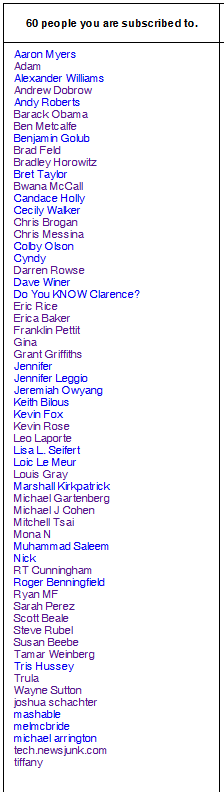
FriendFeed here and there where some FriendFeeders say it’s just not possible to keep up with that many subscriptions.
Not being part of the popular clique myself, I wouldn’t know anything about dealing with a huge number of followers. What I do know is this:
- Stuff that is probably boring, not interesting, or blatant crap won’t stick on the first few pages of FF
- The Hide feature is quite useful in trimming the fat
- FriendFeed users (FriendFeeders?) may very well need better ways to figure out who to subscribe to. I mean, how do you deal with hundreds of Follows? View each person’s feed? *shudder*
“I would like a personal message from all A-Listers explaining why they don’t follow me”
I am a bit curious as to why some people haven’t followed me back:
- Did I say something wrong?
- Is it because I’m black?
- Is it the missing LinkedIn Profile?
- Does my breath stink?
In the end, it really is just curiosity. If I was to ever post something interesting, it would probably get Liked by someone they do follow. What I wonder is, have people made a conscious decision to ignore me? If so, I would probably be a better person for knowing why.
So, I would like a personal message from everyone on my list explaining why they don’t follow me. Oh…wait…they won’t see this anyway. Nevermind.