How To Control the Online Discussion with Google Moderator

Google Moderator is a feature that has allowed some pretty big names to have discussions with their audience without chaos ensuing. It provides a controlled environment where viewers on YouTube can ask questions and, if their question is popular among other Youtubers, get it voted up and answered. It’s like your own personal version of Digg…with video. Now, it’s available to all users.

Moderator is a versatile, social platform that allows you to solicit ideas or questions on any topic, and have the community vote the best ones up to the top in real-time.

Moderator was used in discussions on YouTube with Barack Obama and Canadian Prime Minister Stephen Harper. It’s also been used to facilitate discussion about the future of the African continent and who is the best slam dunker not in the NBA. While YouTube has made updates to the commenting system to make it more manageable and inviting, it’s still difficult to have any type of meaningful discussion within the comments. The noise easily drowns out the signal. Google moderator turns the tables in your favor.

Your first step is to add the Moderator module to your YouTube Channel. Just open the Modules drop down from your channel page and check the Moderator box (don’t forget to Save Changes).

moderator1

The next step is to create your first series. This refers to the entire discussion thread. Your Title is where you ask your community for questions, ideas, or suggestions on some topic. The Description allows you to got a little more in-depth as to what you want from your audience. You can optionally include a link to a YouTube video here if you are more comfortable expressing yourself on camera or need to attach related video content. One thing to note is that you can actually specify whether users will submit mostly questions, ideas, or suggestions. You can also specify start and end times for the series if it coincides with an actual event or you just want to limit responses.

moderator2

Each user response can also have a video link attached. There is no way to comment on individual post, which helps to keep things clean and focused. The only way a viewer can give feedback is by giving an item a thumbs up/down. Those items that get the most positive attention float to the top so that you can provide a video response.

Besides being a great way to get user feedback on serious issues, this is a great feature for YouTube personalities that thrive by entertaining or helping their audience. It will be easier to crowdsource your audience. Whether it’s a certain song they want to see performed, some problem that needs a solution, or some type of challenge they want to see completed. A great way to keep the good content flowing.

How will you use Google Moderator?

Get Bookmarklets in Chrome Applications with Shortcut Manager

I accidentally stumbled across  this in looking at the Quix bookmarklet. I’m a heavy bookmarklet user, especially after switching to Google Chrome. One of the bookmarklets I use the most is for the PassPack password manager. This allows me to login to any website with a single click.

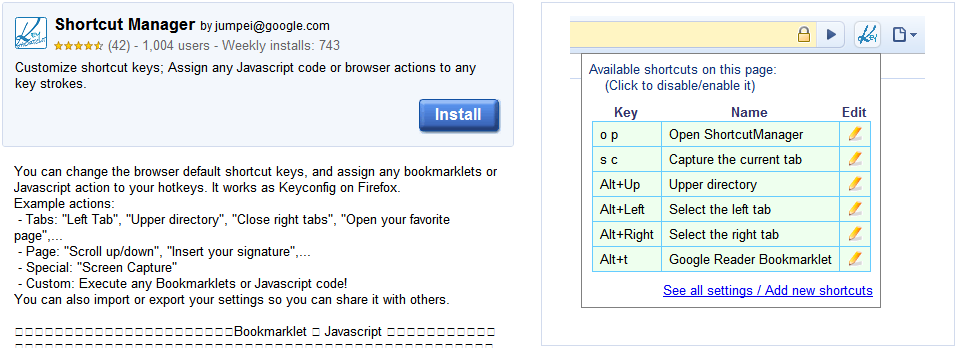
The problem is that, if I’m using an application shortcut or pop-up window, I can’t access my Passpack bookmarklet or any of my bookmarks. Then, I came across the Shortcut Manager Chrome extension. It allows you to assign a shortcut key to a block of javascript code. So, I can assign a key sequence that executes any of my bookmarklets. The steps are simple:

  1. Install the Shortcut Manager extension
  2. Right-click the Shortcut Manager icon and open the Options
  3. In the Shortcut Key box, press the keys you’d like to assign (I chose Ctrl+Shift+l)
  4. Choose the Execute Javascript option below
  5. Paste the javascript code for your Passpack bookmarklet into the text box
  6. Add a description

Now, you can hit Ctrl+Shift+l to run your Passpack bookmarklet inside of any Chrome window. This works in App shortcuts as well as in any popup windows (which I encounter with Posterous all the time). If you’re looking for a geekier solution, check out my Bookmarklet Key Bindings AHK script.


Reblog this post [with Zemanta]

Thinking Bigger: Living in Your New House

Ranch style home in North Salinas, California

Image via Wikipedia

This is a Sponsored Post written by me on behalf of Coldwell Banker. All opinions are 100% mine.

Many people have developed a culture of thinking small. We lament about stuff we can’t afford. We talk about how broke we are. We make jokes about how messed up our credit is and we would never be able to do something like buy the car of our dreams or purchase a house. Thinking in this way is a downward spiral, a race to the bottom. Even when you’re joking, thinking negative brings you negativity.

One example of thinking bigger can be found in the concept of buying a home. It seems like such a huge and difficult thing to do, especially if you’re not confident in your credit history or feel like you don’t make enough money. Just as with anything else in life, though, you won’t know unless you try.

“Not bothering to try is the same as failing, except that you don’t learn anything from it.”

With the 2010 Homebuyer Tax Credits, this is even more incentive to step out and try something you didn’t think was possible. This federal income tax credit has been extended and expanded to include homeowners who wish to “move on” after 5 years of living in their current property, as well as first-time homebuyers. If you have one of these properties, make sure you get covered by property and casualty insurance so they can cover you just in case of any disasters or damages caused by other people. If you end up finding a broker, make sure they use this p&c software.

“Live in your new house mentally until it takes form around you physically” –Wallace D. Wattles

If you make less than $125,000 as an individual or $225,000 as a family or have lived in your current home consecutively for 5 of the last 8 years, you are eligible to receive a tax credit ranging from $6,500 to $8,000. To say it a different way, the federal government wants to pay you thousands of dollars for getting a new house and stimulating the economy. You have to act now as there may not be another extension. You need a written, binding contract by April 30, 2010 (close by June 30, 2010.)

“Shoot for the moon. Even if you miss it you will land among the stars.” –Les Brown

Start thinking bigger and stop sabotaging your own success before you ever get started.

Visit my sponsor: 2010 Homebuyer Tax Credits

Reblog this post [with Zemanta]

One-to-Many Posting Options Still Lacking

I just recently (today) started using a service called Amplify that I learned about on Twitter. It’s supposed to let you easily share things across your social networks and provides a central place for discussion. I won’t get into too much detail about the specifics, but there is one major thing that instantly bothered me. Here is a screenshot of a post on my Ampblog regarding the RPM Challenge:

AmplifyRPM

Looks good, right? The bookmarklet is excellent. Let’s you select regions of the page and intelligently pieces them together into a baby blog post. I was impressed, until I took a look at how Amplify posted to my other services.

AmplifyTwitter

Ok, fair enough. Twitter doesn’t do images and is limited to 140 characters. This is good. I believe the URL is only that long because I hadn’t connected Bit.ly yet.

AmplifyFacebook

Uh, what’s this? It looks just like the tweet. I’m quite sure Facebook is capable of handling images and including thumbnails of stuff when you share it, so why is this Facebook share so bland?

AmplifyPosterous

Here is the Amplify post on my Posterous blog. Again, no images. Why is the good stuff being stripped away?

As you all may know, I’m a Ping.fm-aholic. It’s my go-to service when I want to speak to everyone everywhere. My problem with Ping.fm has always been that it doesn’t really do video and images (well, it does photos to flickr). I can’t be mad at that because Ping.fm wasn’t created that way. It’s all about status updates.

The other tool I use a lot for posting one-to-many is Posterous itself. It actually does do a better job of carrying over video and photos, but it has the same problem that Amplify does when it comes to Facebook. No Media!

PosterousFB

Well, sometimes photos show up, but videos don’t embed. Oh, I also have to run it through Feed-buster to get images in FriendFeed (yes, I still FriendFeed).

I am well aware that there are probably technological, underlying issues with getting media into Facebook and getting it to display nicely. I’m also aware that there may be issues with trying to get external images and video to show up on a 3rd party service. As a user, though, none of that matters. The point is still that I can’t share stuff the way I want. I have to settle for less…and that kinda sucks.

How to Reverse Your Polarity

snapshot

Whatever things you hold onto in your thoughts will be the things you get out of life. I’m talking about your real thoughts, the ones in your subconscious, not the ones in your head as you look at your reflection and chant “I am somebody.”

Following from that, there is a serious problem with the way most of us think. Instead of thinking about what’s positive in our lives, we focus on everything that’s negative. Thinking about these negative things will, eventually, bring them into your life. Of course, this isn’t true of all of your thoughts, just the ones you focus on the most.

I’m sure this is some kind of survival mechanism, always looking out for danger and thinking about how to avoid it but, this is completely unnecessary in the world we live in now. For some people, it borders on paranoia.

For instance, some people spend a lot of time thinking about sickness. Some of them have even been diagnosed with stuff, helping to keep the thought of SICK at the forefront of their minds. Every time they don’t feel 100%, the thought of some ailment or another is amplified in their mind, bringing about the very thing they dread.

Do you know parents who are over-protective of their kids?

The children can’t play without a close watchful eye, they can’t leave the yard, they’re constantly admonished about this or that. Get down from there! Be careful! Slow down! You’ll put your eye out! A constant barrage of verbal warnings fueled by a mind riddled with doubt about their child’s safety.

We have it backwards, folks. If we keep focusing on what we don’t want, it’s exactly what we’ll get. The trick is to reverse your polarity. Any time you find yourself focusing on the negative, flip it to the positive:

  • Nobody wants to see their kids hurt. The next time you find yourself stressing about it, focus instead on how well they’re developing. How fearless they are. How fast they can move. How agile they are.
  • We have an extensive list of https://tranquilme.com/apply/, from Swedish massage and trigger point release to lymph drainage, all designed to address concerns from acute yet straightforward issues to complex and chronic conditions,

    The next time you’re feeling slightly off, realize that it’s probably no big deal. Your reality is health, as that is the way we spend most of our lives. I’m not saying you shouldn’t get certain things checked out by a professional, but you shouldn’t feel that every little thing is the beginning of the end.

In a more general sense, you have to catch yourself when you see that you’re dwelling on potential failure of any kind. Refocus on your goals, the things you actually want your life to be, and don’t be afraid to take those actions that will bring those things to you.

Can you reverse your polarity?

Post Format: Chat

Abbott: Strange as it may seem, they give ball players nowadays very peculiar names.

Costello: Funny names?

Abbott: Nicknames, nicknames. Now, on the St. Louis team we have Who’s on first, What’s on second, I Don’t Know is on third–

Costello: That’s what I want to find out. I want you to tell me the names of the fellows on the St. Louis team.

Abbott: I’m telling you. Who’s on first, What’s on second, I Don’t Know is on third–

Costello: You know the fellows’ names?

Abbott: Yes.

Costello: Well, then who’s playing first?

Abbott: Yes.

Costello: I mean the fellow’s name on first base.

Abbott: Who.

Costello: The fellow playin’ first base.

Abbott: Who.

Costello: The guy on first base.

Abbott: Who is on first.

Costello: Well, what are you askin’ me for?

Abbott: I’m not asking you–I’m telling you. Who is on first.

Costello: I’m asking you–who’s on first?

Abbott: That’s the man’s name.

Costello: That’s who’s name?

Abbott: Yes.

Costello: When you pay off the first baseman every month, who gets the money?

Abbott: Every dollar of it. And why not, the man’s entitled to it.

Costello: Who is?

Abbott: Yes.

Costello: So who gets it?

Abbott: Why shouldn’t he? Sometimes his wife comes down and collects it.

Costello: Who’s wife?

Abbott: Yes. After all, the man earns it.

Costello: Who does?

Abbott: Absolutely.

Costello: Well, all I’m trying to find out is what’s the guy’s name on first base?

Abbott: Oh, no, no. What is on second base.

Costello: I’m not asking you who’s on second.

Abbott: Who’s on first!

Costello: St. Louis has a good outfield?

Abbott: Oh, absolutely.

Costello: The left fielder’s name?

Abbott: Why.

Costello: I don’t know, I just thought I’d ask.

Abbott: Well, I just thought I’d tell you.

Costello: Then tell me who’s playing left field?

Abbott: Who’s playing first.

Costello: Stay out of the infield! The left fielder’s name?

Abbott: Why.

Costello: Because.

Abbott: Oh, he’s center field.

Costello: Wait a minute. You got a pitcher on this team?

Abbott: Wouldn’t this be a fine team without a pitcher?

Costello: Tell me the pitcher’s name.

Abbott: Tomorrow.

Costello: Now, when the guy at bat bunts the ball–me being a good catcher–I want to throw the guy out at first base, so I pick up the ball and throw it to who?

Abbott: Now, that’s he first thing you’ve said right.

Costello: I DON’T EVEN KNOW WHAT I’M TALKING ABOUT!

Abbott: Don’t get excited. Take it easy.

Costello: I throw the ball to first base, whoever it is grabs the ball, so the guy runs to second. Who picks up the ball and throws it to what. What throws it to I don’t know. I don’t know throws it back to tomorrow–a triple play.

Abbott: Yeah, it could be.

Costello: Another guy gets up and it’s a long ball to center.

Abbott: Because.

Costello: Why? I don’t know. And I don’t care.

Abbott: What was that?

Costello: I said, I DON’T CARE!

Abbott: Oh, that’s our shortstop!

Leapfish Brings the Web New Life

LeapFish is an interesting search portal that creates it’s results by pulling together information from the major search engines. It also includes results from the social web and embeds all types of media directly on the results page. As you type your search, the results are pulled together using their “proprietary hyper-threading technology” in conjunction with the API’s of each service. Basically, LeapFish is a meta search engine.

Today, LeapFish is kicking it into overdrive by adding something me and most of the web is pretty excited about: Realtime. They will combine this with tighter integration with social networking sites and the ability to basically share anything you find instantly to your social networks from LeapFish.com.

Leapfish 2.0 will yield information from every inch of the Internet – breaking news headlines, YouTube, Twitter, Facebook, etc. – and will even allow for user ratings to ensure that everyone receives the most important information first.

Leapfish is calling the ever-changing environment that the web has become the new Living Web.

There are other realtime search engines out there, but they haven’t really delivered what they’ve promised as far as I can see. Leapfish, approaching the situation from a different perspective, combining your regular web search with realtime results from the social web, and allowing you to easily share the hottest new stuff,  could be one of the most powerful tools we’ve seen in a while.

LeapFish is conducting private demos prior to the highly anticipated launch, if interested please email demo@leapfish.com

Post?slot_id=83112&url=http%3a%2f%2fsocialspark

Getting Things Done with Doit.im

Doit.im is an Adobe AIR application that is closely tied to the original Getting Things Done techniques. The goal is to provide one simple interface that will help you hit the main GTD principles: Collect, Process, Organize, Review, Do. It’s a simple to use application with a clean interface and may be exactly what you’re looking for if other productivity solutions turned you off somehow.

Doitim2.png

When you start Doit.im, you will be prompted to login. If you don’t already have an account, simply click “Sign Up” to create your account. This account is necessary in order for your data to sync with the Doit.im servers. This lets you access your tasks from any other system running the Doit.im client. One very important factor in making sure your productivity system is successful is for it to be accessible from anywhere, so this syncing ability is definitely a step in the right direction. To actually sync your tasks, click the double-arrows at the top of your menu (looks like the refresh button on your web browser).

Collect

Your Inbox is where all new tasks will show up. You can create one by clicking the New button at the bottom, or using the input box at the top. This is the area where you will do your brain dump. Just think of all the stuff you need to do, no matter how random or unsubstantial, and add it here. This is not the step to agonize over the importance of things, just get them down.

Process

Now is the first step in making this huge list of random stuff look a little less imposing.

  • Is this something that will take you less than 2 minutes to do? DO IT NOW.
  • Is this something that needs to get done today? Drag it over to Today to schedule it.
  • Is this something that will take more than 2 minutes, but there is otherwise no reason you can’t get started on it? Drag it to Next.
  • Is this something that someone else actually needs to handle at this point? Hit Forward, put in their email address, and they’ll see it in their own Doit.im Inbox. (they will need to already have an account, which is unfortunate)
  • Is this something that really isn’t pressing, but you might consider doing Someday (ie. learning Japanese or sky diving)? Drop it in Someday and don’t worry about it for now.

I won’t go too much into detail here about GTD specifically, but you can see how dragging and dropping your tasks makes it simple to get them in the right place and positioned for you to get them knocked off your list. Each task can have a specific Due Date, Tags for finer organization control, Notes to add random details, and you can set a task to Repeat.

Organize

Doit.im pretty much handles your organization step for you during the Processing stage. One thing you have to watch out for are projects masquerading as tasks. Any task that can be broken down into steps is actually a Project. Create a new project in Doit.im and add the individual steps there as tasks using your nifty drag-n-drop abilities.

Review

Periodically, you need to review your tasks to make sure everything still makes sense and is relevant. The primary places you’ll need to pay attention to are Next and Scheduled. At the end of your day, you might find it useful to drag a few tasks over to Tomorrow so that they will be in your view the next day. On a weekly basis, take a look at Someday to see if you can make these seemingly far away items a present reality.

Do

This is the area many of us fail at. You have to actually complete your tasks to get anywhere in life. Those Someday/Maybe tasks will never be feasible if you don’t handle your immediately actionable items. Another problem we run into is getting sidetracked or distracted. If it’s not on your list, you probably shouldn’t be doing it. Drag your tasks to Completed once you’ve done them, or check them off and click Complete.