Find the Freshest Hip-Hop Stuff at CurrentHipHop.Com

Cross-posted from my other home at Black Web 2.0 where I write about technology from a different perspective.

Finding the exact types of content you’re looking for is an ongoing battle for many of us. Sure, you probably know a few sites where you can find hot new music, maybe even download it. You probably also follow a few hip-hop blogs. Wouldn’t it be easier if there was one place you could go that brought all of your favorite content together? Maybe an aggregator for hip-hop, rap, and R&B music that also pulled in the latest news about your favorite artists? This seems to be the vision for CurrentHipHop.com.

Hottest New Music

I got a chance to speak with Fahim, the brains behind CurrentHipHop.com,  and I could tell that he has a passion for music. Fahim is a student at Penn State and founded the site with his roommate. He also knows where to find the latest tracks as you can see in the sidebar at CurrentHipHop. You can listen to and download the latest stuff, as well as some older tracks (yesterday is old, right?). The music player is neatly tucked away at the top of the site. If you’re an artist and want your music to be included, just go submit it.

currenthiphophome

Hottest  Content

CurrentHipHop has partnered with a few blogs in order to include their content on the site, including videos. Clicking a story headline will take you to the original article. There are new partnerships in the works, so we should expect to see much more content available here. I like the fact that CurrentHipHop is linking out directly as some other aggregation sites in the past have used the scraping method. If you have a hip-hop blog or website and want to be included, use their contact link at the bottom of their site.

What I’d Like To See

Fahim and his roommate drew CurrentHipHop on paper on March 31st, so it’s just 2 months old. I’d say it already has serious potential. There are a few things that I think would be cool to add:

  • Easy methods for sharing individual tracks and stories right from the site.
  • Possible integration with social sites like Last.fm and Pandora on the individual artist pages
  • Maybe a system for tracking plays so you can tell which tracks are the hottest
  • I don’t want to see it turn into another Digg clone as we already know those don’t really work

I’d really just like to see the site get a little more social by integrating tools already available. Maybe that’s just the social media geek in me, though.

The Future

We have previously talk a lot about content aggregation and how powerful it is in this new age of information overload. Having everything in one place is just useful. Eventually, the process of adding content to the site will be automated to make it easier for content creators.

Go check out the site and tell us what you think and feel free to hit up @Fahim on Twitter.
bit.ly is the Authority on Bookmarklet Design

bitly1

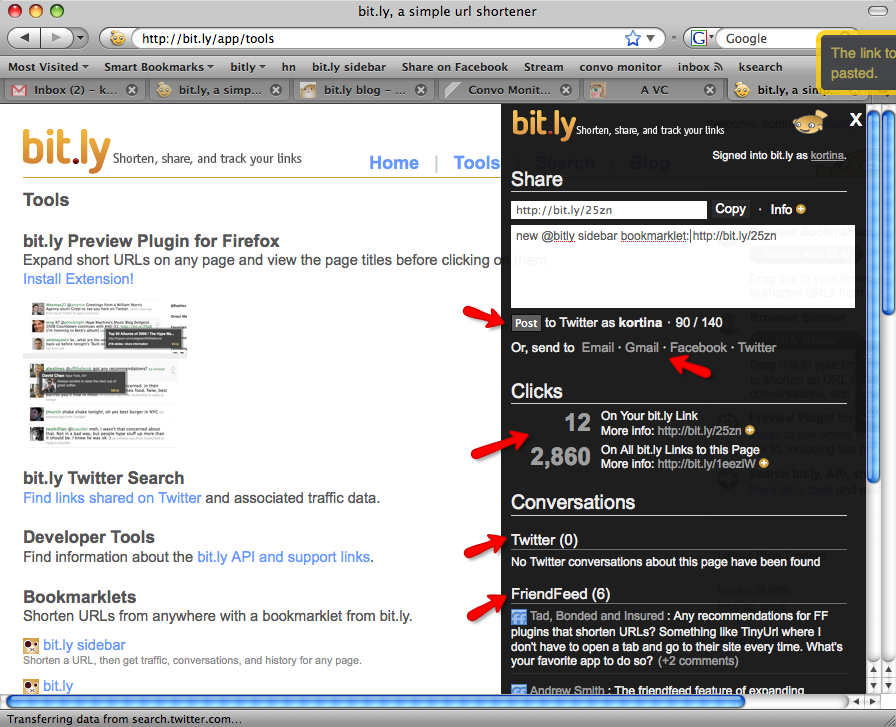
Ever since I first saw their sidebar bookmarklet, I was hooked on the bit.ly url shortener (now the biggest of them all according to TC). It is the epitome of what a bookmarklet should be. I remember being amazed because I didn’t even think you could make a bookmarklet so sexy. There are other services (FriendFeed, Tumblr, Posterous, Diigo) with nice bookmarklets, but bit.ly was the first I’d ever seen of it’s kind. There are a few reasons it rocks:

  • It opens up right on top of the page I’m on
  • It not only allows me to shorten and copy the current URL, but also gives me stats on the URL
  • At no point am I forced to break my workflow and actually visit the bit.ly site
  • At no point does it open another tab or window for me to deal with
  • It’s pretty to look at

Bit.ly even updated the sidebar bookmarklet today so that you can share the shortened URL on Twitter, Facebook, and via email. You compose and post your update right there in the bookmarklet. Completely awesome.

Services like Ping.fm, surprise me because you would think they’d have a snazzy bookmarklet. You would think they wouldn’t drag you away from what you’re looking at. I just want to post an update and I don’t want to have to leave what I’m doing to do so. Hell, whatever I’m looking at right now may have absolutely nothing to do with what I’m about to post.

Why does a URL shortener have such an awesome way to post updates and a service for posting updates does not?

bit.ly’s Publisher Plugin

Besides being available as a bookmarklet, the bit.ly sidebar is also available as a site publisher plugin. With a single line of javascript, you can enable your readers to Tweet links to one of your pages without ever having to leave your site. By not requiring users to leave your site to share a link, you will increase engagement and user retention.

This paragraph caught my eye because it gave me an idea of what the issue here may be. Competition for traffic. As a publisher, I don’t want people to leave my blog. As a reader, I don’t want to stop what I’m doing to share something.

Besides adding up the page views, there’s no reason any service should force me to visit their homepage to use their bookmarklet. The point of a bookmarklet is to be easy, useful and quick.

Don’t screw up my workflow for pageviews.

Check out this screencast of bit.ly’s new design and publisher plugin:

Know of a service with an awesome bookmarklet that I didn’t mention? Do you actually enjoy visiting a homepage everytime you click a bookmarklet? Tell me about it.

Turn Your Inbox Into Hot Lava

Toes of a pāhoehoe advance across a road in Ka...
Image via Wikipedia

I hear people lamenting about their overflowing email in-boxes all the time. Even me own mother has trouble keeping the evil email demons away. Where does it all come from? What are you supposed to do with it? Will it ever end?

Well, this post should get you on the road to conquering your inbox and getting rid of that uneasy feeling that you may have missed, misplaced, or forgot something.

Unsubscribe From Everything

Why did you subscribe to all this crap, anyway? Your inbox is bulging at the seams because you have authorized all these different individuals, organizations, and companies to email you with updates that you never actually pay attention to. Even if you do enjoy these updates, they may get lost in the deluge.

The very first thing you need to do is go through your inbox and unsubscribe from every newsletter, mailing list, and auto-responder that is not of utmost importance. Do you really need an email every time someone pokes you on Facebook? Let’s be real, all the special  reports, groundbreaking videos, and  member’s only discounts are not doing you any good.

Filters Are Your Friend

If your email client of choice doesn’t have a method to filter a message on contact, I feel sorry for you. You need to set up your email like it’s hot lava. Nothing should touch it. Anything that does make it in should get burned up instantly. This is not as hard as it sounds. The key is in knowing beforehand what types of messages you receive and having your client handle them automatically.

Mailing Lists

Every newsletter and mailing list that you did not unsubscribe from needs to be automatically filtered out of your inbox and filed under a label.

Open up one of the messages that needs to be filtered:

  • The key feature that you’ll need for this step is “Filter messages like these…” in the “More Actions” menu.
  • You want to check “Skip Inbox”. This will Archive the message so that it doesn’t show up in your Inbox, but you can still find it by labeling, starring, or searching for it.
  • Choose a label that the message will be filed under, creating a new one if necessary.
  • Apply the filter to all matching messages

Important Emails

There are certain emails that I already know require me to do something. You should be able to easily identify these. Not just emails from your boss, but emails that definitely require immediate action. I automatically Star these types of emails and archive them so they aren’t sitting in my inbox.

Follower / Subscriber Notifications

If you’re like me, you have given up on keeping track of followers via email. If you do still have these activated, they should definitely be filtered out of your Inbox and labelled. There is no reason to have these sitting in your Inbox.

Use Your Imagination

Filters are very powerful and can also get pretty intricate. Email is pretty subjective. Given these two facts, you need to identify which emails in your inbox fit specific patterns and use the filtering feature to get them out of your inbox and either filed away and labelled for later, or starred/flagged so you can take action on it.

Maintenance

There is a more complicated version of this whole Inbox Zero thing, but this is the simplified version I use. When I go to check my mail, I check my Starred items first because those are priorities based on my filters. Once I’ve checked those, I hit the actual inbox:

  • Is this a task that I need to complete? An action item? Star It.
  • Read and archive everything else. Get it all out of your Inbox.
  • Go back to your Starred items and knock out your tasks / action items.
  • At your leisure, read your subscriptions and handle your email notifications

What Do You Think?

I’m just putting the basics out there to give you a starting point. This should work for most of us, but there are definitely specific situations that require special attention.

That said, I’m opening this up to questions, comments, and concerns that you may have with your email. I’m pretty good at this productivity stuff, so I look forward to helping you solve your issues.

Reblog this post [with Zemanta]

The Key to Closing the Social Media Sale

Photo of the reverse side of the Key to the Ci...
Image via Wikipedia

Recently caught a post by one of my favorite bloggers, Steven Hodson over on Winextra Shooting Bubbles (gratz on the rebrand!). He was talking about The Good, The Bad and The Ugly of SEO and Marketers and how good white hat seo link building services are. The post basically covers how marketers jump into the social media space and flail around with no clue what they’re doing, all the while claiming to be “ninjas” and “experts.”

One particular section stood out to me because it’s the same exact line of thinking I’ve formed about marketing as it relates to social media:

You know who a successful marketer is?

It’s the person who you can talk with on Twitter or Friendfeed or by email and feel like you are having an actual conversation – not the target of a sales pitch or that you are riding trapped with them on an elevator. Sure you could be talking about product or service but the moment you throw out a buzzword or two you have crossed the line from being an interesting person to talk with to being just another marketing dreck.

In case you hadn’t noticed, Steven just gave you the key to the city if you’re trying to make money using social media. As a matter of fact, this same mentality works everywhere else.

I believe that every conversation ends in a sale. Problem is, nobody likes being sold or pressured. They would rather evaluate the situation and make a decision on their own.

How do you get someone to make the decision you need them to make?

This is such basic stuff that I’m surprised so few actually get it. You have to convince a potential client or customer that your product or service will benefit them or otherwise provide value. With standard sales, you’d go through a process like:

  • Engage – make an initial pleasant connection
  • Build Rapport – small-talk to make your target feel comfortable
  • Discovery – at this point, you are trying to find out how your product will benefit this specific person
  • Close – by the time you get here, you and your target are buddies. You know exactly how your product or service fits into their life and they feel like you are doing them a huge favor.

For some reason, marketers in social media just keep trying to close the sale, skipping all the important steps necessary before that. This may still work with email marketing (maybe), but it does not work in social media. These are real people you’re talking to and if you don’t treat them as such, you will never succeed.

You have to put the work in if you want this to work for you. This means being real and genuine. Trying to be a part of the community for the purpose of making money won’t work. You have to just be a part of the community. With the web heading towards real-time, it’s all too easy to spot a fake and I or someone else will point you out. If you’re not here to provide value to the community, you may as well pack your things and move along.

Oh, and don’t let the door hit you in the ass on the way out…

Reblog this post [with Zemanta]

8 Ways to Make the New FriendFeed Work For You

Image representing FriendFeed as depicted in C...
Image via CrunchBase

Many people can’t handle the new Beta FriendFeed design. It’s ugly, it’s too fast, it doesn’t have service icons, the layout sucks. This is pretty much the same thing that happened with the first beta and I bet most people don’t even remember what FF was like before that. Whatever the case may be, here are a few things you can try to make the new layout work for you.

1. Go Back to the Old FriendFeed

This may seem like an obvious choice, but you don’t have to use the new beta design. Only problem with this approach is that you will be totally screwed when the Beta becomes the standard.

2. Pause It

The tiny Pause button at the top of your feed will stop real-time updates until you hit Play. It doesn’t matter if you refresh the page or even log out, it stays paused for you. You can also pause the feed by hitting ‘q’ for quiet. This will emulate the behavior of the old FriendFeed, except that you have to manually refresh your browser…which many FriendFeed users were doing anyway.

If manually refreshing is a problem, try the ReloadEvery Firefox plugin or this Refresh Any Greasemonkey script that I Googled for you.

3. Kill the Comments

Get the FFLite Greasemonkey script by Matt Shaulis to hide all the comments in your feed. This will make it easier to scan as you won’t have to deal with random comments popping up while you’re trying to read stuff. It doesn’t appear that you can toggle the script on and off, so you’ll need to disable it to actually participate.

4. Use Filters

Filters are a powerful way to keep track of things you might be interested in and there are a couple of ways to create them. The easiest is to simply search for something and then click make a filter. The other way is to click edit on the “Filters” list (you have to hover it before you see the edit link). The second allows for much easier creation of really complicated filters, including filtering on how many comments/likes something has.

Check out the FF Filters feed for more on filters, including a bunch of examples.

5. Get Your Service Icons Back

Many people miss the little favicons that show you what service each item came from, so Chris Peoples created a Greasemonkey script to bring them back. It uses FriendFeed’s API to grab the icons. You can get FriendFeed Beta Service Icons over at Userscripts.

6. Make It Cleaner

Go grab AJ Batac‘s Cleaner FriendFeed (New Beta Widescreen) Userstyle. It makes the new Beta layout a little more familiar and gets rid of most of the empty space. It also makes it easier to follow conversations by highlighting your comments and those of people you subscribe to in different colors. The entire background of the comment is highlighted so that you can tell what’s going on at a glance rather than trying to focus on those tiny speech bubbles.

7. Tweak Your Twitter

The FriendFeed Twitter Tweaker Greasemonkey script by Ken Sheppardson (sensing a pattern here?) will make it easier for you to pick out tweets in your feed and see who they’re from. You simply create a new Feed that includes the phrase “twitter-friends” in the name and add the Twitter feed for each user you’d like to track.

8. Use Lists

I’ve never really liked lists but, with the hose at full blast, I’ve been looking at implementing them a lot more. The problem is trying to figure out where I should put people. The easiest way to add someone to a list is to hover their name or avatar and hit add/edit. From here, you can add someone to an existing list or create a new list for them.

List ideas: Tech, Social Media, Music, Favorites, Baconites, NSFW, FFersILF, Business, Pleasure, Politics, FFholics, Video, Fitness, Zombies (feel free to add your own favorite list names in the comments).

How Are You Holding Up?

I remember the original beta did cause quite an uproar, so we’ll need to do everything possible to make the transition smoother this time. What techniques, resources, or features are you taking advantage of to cope with the new Beta FriendFeed? Do you like the beta just the way it is? Let me know what you think.

Reblog this post [with Zemanta]

Chi.mp: It Only Sucks Because You Don’t Know What To Do With It

I previously talked about Chi.mp in regards to uniting your online identity. After getting a chance to speak directly to the Chi.mp team (Thanks guys and gals!), I gained new insight as to what the service is for. Chi.mp does have the ability to aggregate your data, but that’s not really what it’s for. It isn’t competing with any of your current social networking sites.

Click through to read the whole article (written by yours truly)

via Chi.mp: Not Just Another Data Aggregator

Disqus Dumps Voting and Implements Likes

Disqus T-Shirt Found in BenSpark's Big Box of ...
Image by BenSpark via Flickr

Just caught a Tweet from Daniel Ha mentioning a new Disqus upgrade. Looks like they’ve dumped their normal ratings system for something more like FriendFeed, allowing you to Like comments. This just goes to show that FriendFeed hit the nail on the head with that simple feature as Facebook and 12seconds.tv (bumps) have both also implemented something similar.

How to Upgrade

I thought I would be able to simply go into my WP admin interface and automatically upgrade the plugin, but it turned out to not be that easy. I wasn’t given any notification that the plugin had an update available. When I accessed the Search/Install interface and searched for Disqus, I saw the updated version, but WP told me my current version was newer. I’m not sure what logic they’re using, but 2.0-xxx is definitely not newer than 2.1-xxx in my book.

I had to uninstall the version I had and manually install the new plugin.

Other Notes

According to the Disqus blog, this update speeds up Disqus in all browsers:

  • Internet Explorer is up to 5x faster
  • FireFox is up to 3x faster
  • Webkit (Safari and Chrome), and Opera is up to 2x faster

There is also a Media menu that allows you to post a video comment (via Seesmic) and Disqus indicates more media functionality may be on the way.

I’m hoping specifically for 12seconds.tv support since that would make video commentators get to the point in a hurry (12 seconds, to be exact) and not ramble on for 20 minutes. This might actually make video comments feasible to view for the average person. As it stands, people avoid looking at video comments like the plague.

Reblog this post [with Zemanta]

Did You Get Caught Trying to Boost Your Follower Count?

punkdTwitter is gaining popularity, attracting people of all types. They talked about Twitter on The View. George Stephanopoulos interviewed twitterviewed John McCain. P. Diddy has jumped in with both feet, keeping us updated and motivated (Let’s Go!!!). As always, with great power comes great responsibility…wait…I mean when a social service’s numbers blow up, most of them are probably just spammers and other types of marketers.

There is nothing wrong with marketing in social media. It’s a good place to establish your brand and make connections. The problems arise when the marketers start Doing It Wrong(tm). It’s almost disrespectful. Maybe I’m just sensitive.

Twitter Isn’t a Mailing List

We could go back and forth on this point all day long, but you’d still be wrong. Twitter is not your own personal mailing list. Let me restrict the parameters to make this more clear:

  • A standard network or Internet marketer sets up a mailing list attached to some kind of auto-responder.
  • The auto-responder is stuffed with a bunch of emails scheduled to fire off at specified intervals.
  • The goal here is to move your target to action without you lifting a finger.

Problem with that is, when someone subscribes to your mailing list, they usually expect this will be the case. When someone follows you on Twitter, they expect to see you updating your status. Not pitching them on your product.

The proliferation of services that will schedule tweets and shoot out automated messages to Twitter just illustrates my point here. We all know how I feel about social media automation.

Your Followers Aren’t Following You

Many network marketers and “small-business” owners have purchased leads before. The selling point on these always mentions something like “pre-qualified” or “targetted.” Anything that makes you think the the people on these lists are interested in what you have.

Once you start contacting these leads, you quickly realize that these people mostly want nothing to do with you. They were probably careless with their email address, or filled out some survey where one of the questions asked them if they had an interest in making money from home. Who doesn’t want to make money from home?

There are a bunch of services popping up which allow you to build your followers list automatically. Now, anyone can have thousands of followers without investing any time in Twitter at all. All they have to do is signup or opt-in and all the other people that have signed up and opted-in follow you just as you follow them.

Am I the only one that sees a pattern here? Nobody who signs up for these follower-generation services cares what you have to say. They don’t want to buy your crap or join your business. Just like you, they’re trying to get a bunch of followers on their “list” so that they can pitch their crap.

You Just Got Punk’d

So, you’ve signed up with this service, probably given up your Twitter credentials and the whole nine, and the only connections you’re going to make are with people who want to sell you something. Not only that, guess who makes out like a bandit? The service you signed up for. They played on your greed and now they have your contact info and twitter credentials. Not only that, but I bet they will turn around and sell you out to the highest bidder.

You might as well start looking around for Ashton, cuz you have definitely been had. Is that a camera hidden in the corner there?

There are people who just don’t know any better. They just wanted a bunch of followers because that’s supposed to be the thing to do in social media. It’s supposed to increase your status and make you somebody. Well, it doesn’t and I’m sorry you were misinformed.

For you marketer-types, you need to step your game up and start doing things the right way. If you’re going to be lazy about it and try to take shortcuts, you may as well quit now. You’ll never last. Also, you won’t make any money.

Reblog this post [with Zemanta]

12seconds.tv Scratches the Surface of Twitter Integration

12secondstweetbox

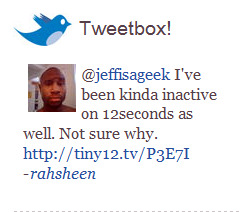
I got an email from 12seconds.tv the other day about their new Tweetbox feature. 12seconds is basically the Twitter of video, allowing you to post quick 12s videos via web or mobile. Their Tweetbox feature grabs the latest tweet about your 12seconds video and displays it on your profile.

Oh how we love Twitter!  We love it so much that we’ve decided to create a special feature that allows your Twitter friends to publicly comment on your videos.  All they have to do is include the Tiny12 link from your video in their tweet and we’ll automatically pull it in and put it right into your TweetBox.  You can find your TweetBox sitting right on your home and channel page.

12seconds Gets It Right

You can probably think of a million services that post to Twitter for you. Why do they always make this the priority? I can think of a few reasons:

  • From a developer stand-point, posting to Twitter is easy once I have your credentials
  • Posting a link to my service in your Twitter stream helps my service gain popularity
  • Some integration with Twitter, however half-assed, leads users to believe your service is on the bleeding edge

Don’t get me wrong, I’m not bashing any service that makes an effort to integrate with other services, but there is a piece missing here that always bothers me. This is especially true of services like FriendFeed and Pikchur, where comments enrich the value of the service.

Discussion Fragmentation…Again

Let’s talk about FriendFeed. I import my updates from Twitter. People that see my item in FriendFeed have the option to comment on it. They also have the option to have that comment sent to me as a reply on Twitter.

What ends up happening is I get the reply in Twitter and continue the discussion on Twitter. Meanwhile, back on FriendFeed, there is a bunch of discussion going on that doesn’t get sent through Twitter. Not only that, but the discussion I’m having on Twitter doesn’t go back through FriendFeed. So, I’ve created two separate discusion threads from the same FriendFeed item.

What would be great is for FriendFeed to grab items from Twitter that are in-reply-to FriendFeed items. I’m not sure of the technical details here, but I think it’s possible. I also think it’s possibly difficult, but I have my blogger hat on right now, so I’ll leave the technical discussion alone for now.

12seconds Could Do It Better

As it stands, 12seconds only grabs the single latest tweet about your videos and displays it on your channel page. There is no Tweetbox on the individual video pages. The context of the comment is pretty much stripped away as it’s unclear which video the tweet is about. The remedy for this would be to grab all tweets about a specific video and display them as comments on that video’s page.

12seconds has set themselves up for success here because they can simply (again, speaking as just a blogger) grab any tweets that mention their URL’s and correlate them to their user’s and videos using their own database.

FriendFeed also has it’s own URL shortening service and could possible do something similar. I believe the Twitter API also includes a method to find out what tweets are in-reply-to other tweets, so there should be a way to grab entire threads of tweets that correspond to FriendFeed items and apply them as comments for those items.

Obviously, this is mostly speculation, but if we don’t attempt to do what might seem impossible,  all this will get boring real quick.

What Does My Workout Have To Do With Your Future?

A complete weight training workout can be perf...
Image via Wikipedia

I started lifting weights at the end of 2007. Since I was about a buck thirty-five soaking wet, I started off doing basic strength training programs using the best rowing machine. The idea is that you have to build a foundation before you start fine-tuning your physique. To be more specific, you can’t work on defining your chest and abs if you have no chest and abs.

Continue reading “What Does My Workout Have To Do With Your Future?”

Save Space In Your Sidebar with Tabbed Widgets

I am engaged in an ongoing battle with my blog’s sidebar. I’ve never been sure what I’d like to put over there or how I want it laid out. When I recently switched to Tarski, I decided to revisit my widgets (hey, I made a funny) and see what I could do to make things easier.

Let me give you a little background. I like hacking code. Doesn’t matter what kind of code it is or even whose code it is. On the flip side of that, I don’t like re-inventing the wheel or making things harder than they have to be. I have no problem digging into my WordPress plugins and themes and fiddling with the PHP code in order to bend it to my will, but if there is an easier way, I’m all for it.

The Quest For a Tabbed Interface

Tabbed interfaces are pretty popular. They let you squeeze lots of info into a small space and help your interface to look cleaner and simpler. I was originally using the Javascript tabifier to achieve this type of widget in my sidebar, displaying my Recent Posts, Popular Posts, and Disqus comments.

Continue reading “Save Space In Your Sidebar with Tabbed Widgets”

Should You Be Using Gubb Instead of Remember The Milk?

I recently came across another task/list management web application called Gubb. Now, as you all know, I’m a hardcore Remember The Milk fan. I’ve written extensively about it’s Smart Lists and Tags, but that doesn’t mean I’m going to ignore a good thing when I see it. Also, it seems there are some core features lacking in Remember The Milk, that are pretty important to some people. Here are a few features that Gubb has that are missing from RTM:

Continue reading “Should You Be Using Gubb Instead of Remember The Milk?”

LeapFish: Just Type It, But Will Anyone Use It?

Image001LeapFish is a service that provides search results from multiple search engines all in one place. They have connections with all the major search portals like Google, Yahoo, MSN and others. As you type your search, the results are pulled together using their “proprietary hyper-threading technology” in conjunction with the API’s of each service. Basically, LeapFish is a meta search engine.

We’ve created the first multi-dimensional information aggregator and search portal in the world. Our goal is to gather, organize and render the most relevant information from the internet’s most valuable destinations for each users search, in one single simple shot.

Continue reading “LeapFish: Just Type It, But Will Anyone Use It?”

A Few People To Check Out

I like promoting interesting people, so I posted a message asking for people to send me their links. These are the people that actually responded. If you don’t already follow them, you may want to check them out. I would have liked to link to you as well, but you didn’t respond, so I guess maybe next time. 🙂

Continue reading “A Few People To Check Out”

An iPhone Case Won’t Help it Work Better, Will it?

Robert Scoble
Image by Thomas Hawk via Flickr

It amazes me how the most important and basic things can fly right under your radar. I recently had a colleague ask me what they should be doing to promote their content. What should they do to get their blog out there? How should they go about creating a presence on the web? They had researched their blogs PageRank, checked their backlinks, and tweaked their theme. They couldn’t figure out why people weren’t linking to them.

Continue reading “An iPhone Case Won’t Help it Work Better, Will it?”