BET Unveils Fandemonium Award to Measure Artists’ Online Clout

BET is launching a new award category that focuses on the online and mobile power. It will debut at this year’s BET Awards on Sunday, June 27th. In a two-week promotion on 106 & Park followers of Trey Songz, Chris Brown, Justin Beiber, and Nicki Minaj will compete to push their artist to the top using the AOL Lifestream social aggregator.

“Today’s successful artists don’t just make hits, they create movements where people can participate and connect with them in ways like never before. This award pays homage to the digitally engaged fans, and we’re excited to partner with AOL to amplify our audience’s voice at the BET AWARDS ’10. Over the past year, BET has experienced tremendous growth across online and mobile platforms and this partnership fits perfectly with our strategy to be right at the pulse of entertainment culture and also drive it.” -Denmark West, President of Digital at BET Networks

Fans will be able to leverage the power of AOL Lifestream to cast their votes by posting updates related to their favorite artists across sites like Facebook, Twitter, Digg, YouTube, and FourSquare. With one single update, they can populate their entire online social world.

Viewers will be able to watch 106 & Park weekdays at 6:00pm to get information on the daily challenge. They will also be able to check the status of their artist of choice. Challenges will be centered around BET.com and BET mobile, while also including activities on other networks like Facebook and Twitter. Wherever the challenge is located, you can always see what’s going on at lifestream.aol.com/bet, which will collect everything in one place. AOL will also promote the BET Awards ’10 across their various online portals like Black Voices, AOL Music, PopEater and the AOL homepage.

These artists were chosen based on their existing rabid fan bases and star power in the industry. We have never seen an award category that is so directly tied to fan’s behavior online. Artists are usually grateful for their fan base, but the Fandemonium category will make it abundantly clear which artists have the most clout in new media. It is good to see an entity that focuses on the black community and black culture integrate old media and new media in this way.

How To Control the Online Discussion with Google Moderator

Google Moderator is a feature that has allowed some pretty big names to have discussions with their audience without chaos ensuing. It provides a controlled environment where viewers on YouTube can ask questions and, if their question is popular among other Youtubers, get it voted up and answered. It’s like your own personal version of Digg…with video. Now, it’s available to all users.

Moderator is a versatile, social platform that allows you to solicit ideas or questions on any topic, and have the community vote the best ones up to the top in real-time.

Moderator was used in discussions on YouTube with Barack Obama and Canadian Prime Minister Stephen Harper. It’s also been used to facilitate discussion about the future of the African continent and who is the best slam dunker not in the NBA. While YouTube has made updates to the commenting system to make it more manageable and inviting, it’s still difficult to have any type of meaningful discussion within the comments. The noise easily drowns out the signal. Google moderator turns the tables in your favor.

Your first step is to add the Moderator module to your YouTube Channel. Just open the Modules drop down from your channel page and check the Moderator box (don’t forget to Save Changes).

moderator1

The next step is to create your first series. This refers to the entire discussion thread. Your Title is where you ask your community for questions, ideas, or suggestions on some topic. The Description allows you to got a little more in-depth as to what you want from your audience. You can optionally include a link to a YouTube video here if you are more comfortable expressing yourself on camera or need to attach related video content. One thing to note is that you can actually specify whether users will submit mostly questions, ideas, or suggestions. You can also specify start and end times for the series if it coincides with an actual event or you just want to limit responses.

moderator2

Each user response can also have a video link attached. There is no way to comment on individual post, which helps to keep things clean and focused. The only way a viewer can give feedback is by giving an item a thumbs up/down. Those items that get the most positive attention float to the top so that you can provide a video response.

Besides being a great way to get user feedback on serious issues, this is a great feature for YouTube personalities that thrive by entertaining or helping their audience. It will be easier to crowdsource your audience. Whether it’s a certain song they want to see performed, some problem that needs a solution, or some type of challenge they want to see completed. A great way to keep the good content flowing.

How will you use Google Moderator?


How to Connect Google Reader Shares to Facebook via Hootsuite

I have a Facebook Fan page, but I rarely post there because they make it so difficult to do so. There is no bookmarklet that facilitates this action. I’m sure there is some obscure Facebook application that might help with this, but I haven’t found it yet. My only recourse has been to actually visit the page and cut/paste a link. Very time consuming and inefficient if you’re working at the level I am when it comes to social media.

I came across a discussion on piping reader shares into Twitter using Reader2Twitter. This got me thinking about Hootsuite‘s RSS/Atom feature, which lets you pipe a feed through Hootsuite and out to the social networks you choose. Rather than have to deal with yet another 3rd party web application, why not just use an existing feature in an application I already use daily?

Adding Your Facebook Fan Page to Hootsuite

The first step is to connect your Facebook Fan Page to Hootsuite. I actually stumbled across this by accident in simply trying to get my GReader shares into Twitter. Note that once you have done this, you can easily post updates to your Fan Page from within Hootsuite on a per-update basis, making it simple to keep your page updated with fresh content for your fans.

  • Click Settings at the bottom of Hootsuite
  • Click the Social Networks tab and then Add Social Network  on the right
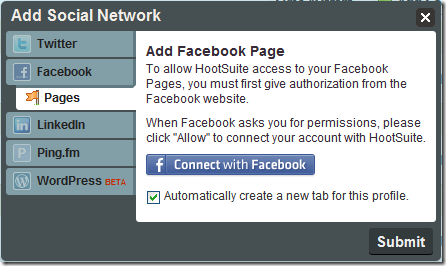
  • In the popup, choose Pages under Facebook to connect your page to Hootsuite

FanPageHoot

Adding Your Google Reader Shared Items Feed

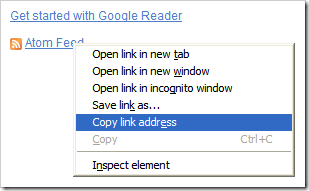
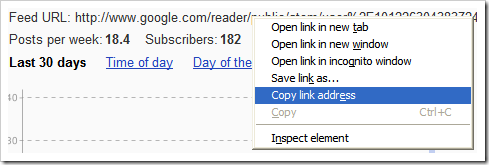
Adding your Shared Items feed is simple. The hardest part is finding the actual feed link. I found my Shares page from my Google Profile (your Google Profile is here). It should be listed as one of your websites. You should see the actual feed link on the right side of that page, just copy it. Alternately, you can go into Google Reader, click Shared Items on the left, and then show details on the right. The feed URL should appear, right-click and copy it.

GFeedLink

GFeedLink2


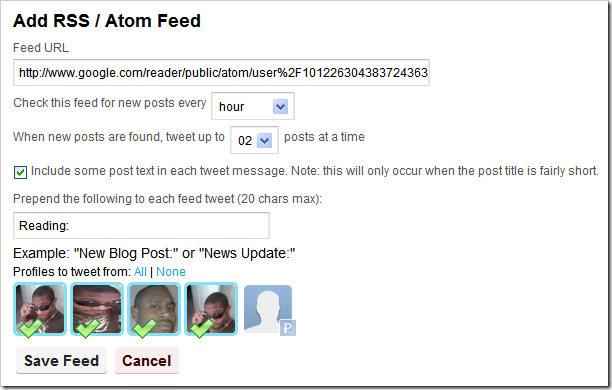
Back in Hootsuite and under Settings choose the RSS/Atom tab and Add New Feed. Paste your shared items feed URL into the first text box and decide how often you want the feed checked and how many tweets you want Hootsuite to send out each time. Be conservative here. If you send any more than a couple of tweets out at a time, you will look like a spammer or a n00b. Make sure you choose which accounts you want updates from this feed sent to at the bottom. Check the screenshot below to see how I have mine setup.

HootsuiteRSS

If you need any further assistance or clarification, please comment here. I would appreciate your feedback and would be happy to help. Also, if you have a better or alternate way of doing this, I’d love to hear it.

Google Buzz, PleaseRobMe, and Privacy Scare Tactics

Buzz

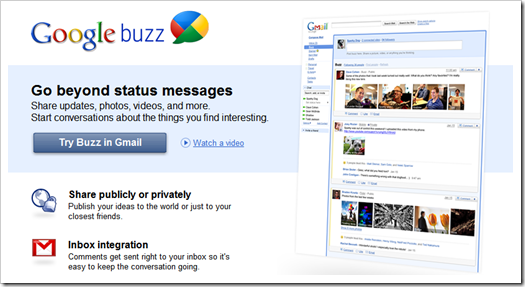
With Google Buzz recently launching inside of your Gmail, many people immediately became concerned about their privacy. The primary reason being that there was a social component inside their email inbox, a place normally reserved for private discussion.

The other concern that arose was the way Google built your network. Most social networks are built, brick-by-brick, by the user. This is a huge pain to repeat every time you join something new. What Google did was use the wealth of information it already has on your to build your network for you and get you started. What they also did was make this new friend’s list visible to the public on your Google Profile page, just like any other social network.

Buzz also has location sharing available, which is a whole other can of worms when it comes to privacy concerns. Which brings us to the website PleaseRobMe.com. It’s a website that monitors location-based checkins and lets the world know when you are not home. Does that scare you?

Regardless of the various arguments, anecdotes, and opinions that can be expressed by these privacy “issues,” there is one thread that remains constant and true:

These so-called privacy concerns are just scare tactics to boost traffic

Think about this logically for a moment. Do your contacts on any social network immediately imply any connection between you and another individual besides the fact that you interact with them on that social network? If my Buzz contacts include Robert Scoble, Louis Gray, P. Diddy, and Barrack Obama, does that mean anything? The answer to both of these questions is Absolutely Not. In order to be afraid (and yes, it is only fear that motivates privacy concerns) of my contacts being made public, I have to make the assumption that someone besides me can make sense of that data. My contacts alone mean nothing to an outside observer.

PleaseRobMe

The same goes for PleaseRobMe. I check in at the grocery store. Suddenly, the world knows I’m not at home. Oh no! Now I’m gonna get robbed because I’m not home. Nevermind the fact that I have a family, a security system, several dogs, a platoon of security ninjas, and nosy neighbors. Regardless of whether the world knows I’m home or not, a potential robber still has to go through the same procedure of casing the house and whatnot before they can actually rob me successfully. Again, in order to be worried about this data being public, I have to make assumptions.

I do not mean to imply that location sharing has never led to a robbery. I also don’t mean to imply that having a public contact list has ever resulted in some other type of misfortune, but these are edge cases. These situations are not the norm. Also, people were being robbed way before location sharing existed.

So, before you go getting excited about the latest privacy scare as it relates to technology, take a moment and think about it. Is it a legit privacy concern, or is it just something being drummed up by the media or the blogosphere to boost their traffic?

h/t Hutch Carpenter

Get Bookmarklets in Chrome Applications with Shortcut Manager

I accidentally stumbled across  this in looking at the Quix bookmarklet. I’m a heavy bookmarklet user, especially after switching to Google Chrome. One of the bookmarklets I use the most is for the PassPack password manager. This allows me to login to any website with a single click.

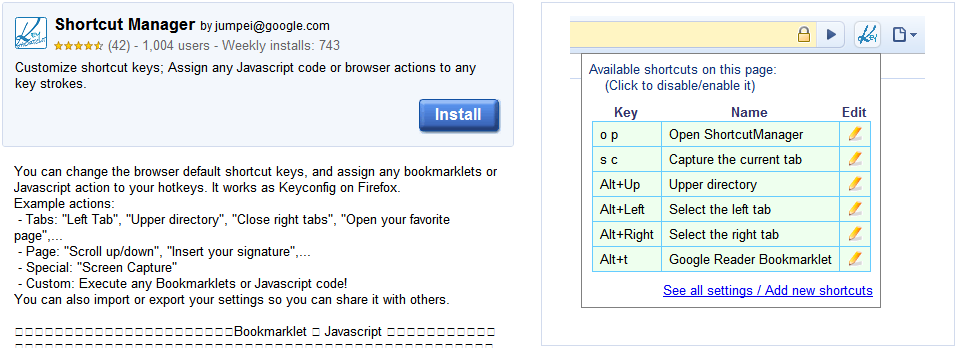
The problem is that, if I’m using an application shortcut or pop-up window, I can’t access my Passpack bookmarklet or any of my bookmarks. Then, I came across the Shortcut Manager Chrome extension. It allows you to assign a shortcut key to a block of javascript code. So, I can assign a key sequence that executes any of my bookmarklets. The steps are simple:

  1. Install the Shortcut Manager extension
  2. Right-click the Shortcut Manager icon and open the Options
  3. In the Shortcut Key box, press the keys you’d like to assign (I chose Ctrl+Shift+l)
  4. Choose the Execute Javascript option below
  5. Paste the javascript code for your Passpack bookmarklet into the text box
  6. Add a description

Now, you can hit Ctrl+Shift+l to run your Passpack bookmarklet inside of any Chrome window. This works in App shortcuts as well as in any popup windows (which I encounter with Posterous all the time). If you’re looking for a geekier solution, check out my Bookmarklet Key Bindings AHK script.


Reblog this post [with Zemanta]

One-to-Many Posting Options Still Lacking

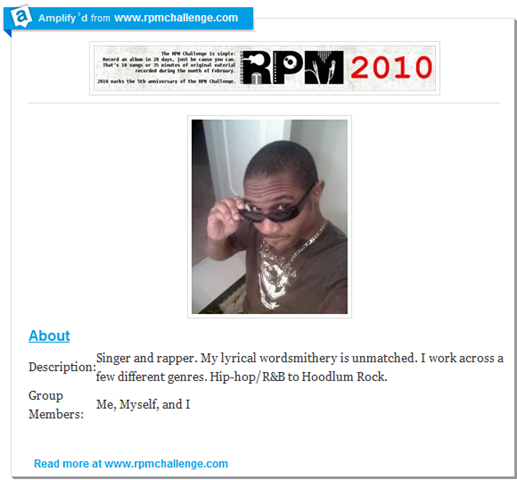
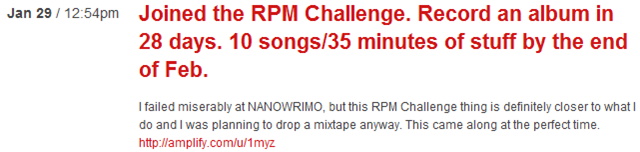
I just recently (today) started using a service called Amplify that I learned about on Twitter. It’s supposed to let you easily share things across your social networks and provides a central place for discussion. I won’t get into too much detail about the specifics, but there is one major thing that instantly bothered me. Here is a screenshot of a post on my Ampblog regarding the RPM Challenge:

AmplifyRPM

Looks good, right? The bookmarklet is excellent. Let’s you select regions of the page and intelligently pieces them together into a baby blog post. I was impressed, until I took a look at how Amplify posted to my other services.

AmplifyTwitter

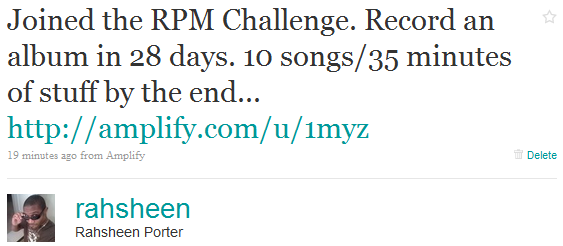
Ok, fair enough. Twitter doesn’t do images and is limited to 140 characters. This is good. I believe the URL is only that long because I hadn’t connected Bit.ly yet.

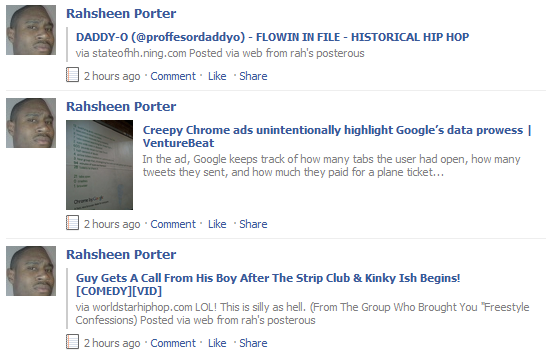
AmplifyFacebook

Uh, what’s this? It looks just like the tweet. I’m quite sure Facebook is capable of handling images and including thumbnails of stuff when you share it, so why is this Facebook share so bland?

AmplifyPosterous

Here is the Amplify post on my Posterous blog. Again, no images. Why is the good stuff being stripped away?

As you all may know, I’m a Ping.fm-aholic. It’s my go-to service when I want to speak to everyone everywhere. My problem with Ping.fm has always been that it doesn’t really do video and images (well, it does photos to flickr). I can’t be mad at that because Ping.fm wasn’t created that way. It’s all about status updates.

The other tool I use a lot for posting one-to-many is Posterous itself. It actually does do a better job of carrying over video and photos, but it has the same problem that Amplify does when it comes to Facebook. No Media!

PosterousFB

Well, sometimes photos show up, but videos don’t embed. Oh, I also have to run it through Feed-buster to get images in FriendFeed (yes, I still FriendFeed).

I am well aware that there are probably technological, underlying issues with getting media into Facebook and getting it to display nicely. I’m also aware that there may be issues with trying to get external images and video to show up on a 3rd party service. As a user, though, none of that matters. The point is still that I can’t share stuff the way I want. I have to settle for less…and that kinda sucks.

Clicker is Your Complete Guide for Internet Television

Clicker1

You missed that recent episode of V or the first episode of CSI’s crossover week. You know they aren’t showing re-runs and you can’t believe you forgot to set the DVR. Maybe you can catch them online, but where? Clicker is a service that will help you answer that exact question: Where are the shows I want to see playing online?

As massive amounts of programming move online, consumers are entering a world of infinite choices, all on-demand. Great! Finding the show you want to watch? Painful. Thousands of episodes from thousands of shows are housed on thousands of different sites, mixed among billions of random clips and videos.

Clicker boasts more than 450,000 episodes, from over 6,000 shows, from over 1,200 networks. They also contain 40,000 movies and 50,000 music videos from 20,000 artists. They refer to themselves as “one part directory, one part search engine, one part wiki, one part entertainment guide, and one part DVR.”

Clicker2

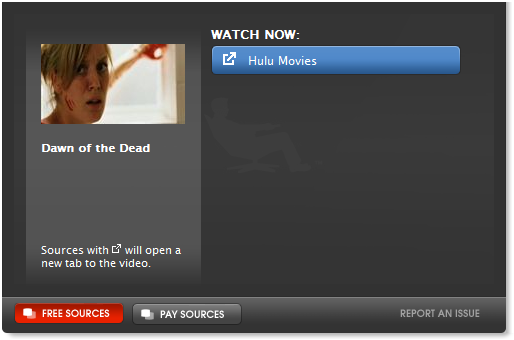
Clicker3Clicker basically indexes video from various sources across the web. Rather than trying to sift through YouTube, Hulu, or other video sites, Clicker serves as your one-stop shop for locating exactly what you need. When possible, you can even watch your shows right from the Clicker website. Otherwise, it links you to the relevant source.

Even if the content you’re looking for is not free, Clicker will show you where you can buy it. The search features auto-complete and thumbnails of the shows you might be searching for. If you’re not even sure what you’re looking for, you can browse through the extensive selection of categories or visit Trends to see what’s hot.

As you browse through the site, you can add items to playlists for later viewing. This works much like Hulu’s queue, including a history of items you’ve already watched. You can also connect Clicker to your Facebook account to let your friends know what you’re watching and to invite 5 lucky people to join the service. Clicker is in private beta, but it only took me a few days to get my invitation, so go sign up and let us know what you think.

Leapfish Brings the Web New Life

LeapFish is an interesting search portal that creates it’s results by pulling together information from the major search engines. It also includes results from the social web and embeds all types of media directly on the results page. As you type your search, the results are pulled together using their “proprietary hyper-threading technology” in conjunction with the API’s of each service. Basically, LeapFish is a meta search engine.

Today, LeapFish is kicking it into overdrive by adding something me and most of the web is pretty excited about: Realtime. They will combine this with tighter integration with social networking sites and the ability to basically share anything you find instantly to your social networks from LeapFish.com.

Leapfish 2.0 will yield information from every inch of the Internet – breaking news headlines, YouTube, Twitter, Facebook, etc. – and will even allow for user ratings to ensure that everyone receives the most important information first.

Leapfish is calling the ever-changing environment that the web has become the new Living Web.

There are other realtime search engines out there, but they haven’t really delivered what they’ve promised as far as I can see. Leapfish, approaching the situation from a different perspective, combining your regular web search with realtime results from the social web, and allowing you to easily share the hottest new stuff,  could be one of the most powerful tools we’ve seen in a while.

LeapFish is conducting private demos prior to the highly anticipated launch, if interested please email demo@leapfish.com

Post?slot_id=83112&url=http%3a%2f%2fsocialspark

Getting Things Done with Doit.im

Doit.im is an Adobe AIR application that is closely tied to the original Getting Things Done techniques. The goal is to provide one simple interface that will help you hit the main GTD principles: Collect, Process, Organize, Review, Do. It’s a simple to use application with a clean interface and may be exactly what you’re looking for if other productivity solutions turned you off somehow.

Doitim2.png

When you start Doit.im, you will be prompted to login. If you don’t already have an account, simply click “Sign Up” to create your account. This account is necessary in order for your data to sync with the Doit.im servers. This lets you access your tasks from any other system running the Doit.im client. One very important factor in making sure your productivity system is successful is for it to be accessible from anywhere, so this syncing ability is definitely a step in the right direction. To actually sync your tasks, click the double-arrows at the top of your menu (looks like the refresh button on your web browser).

Collect

Your Inbox is where all new tasks will show up. You can create one by clicking the New button at the bottom, or using the input box at the top. This is the area where you will do your brain dump. Just think of all the stuff you need to do, no matter how random or unsubstantial, and add it here. This is not the step to agonize over the importance of things, just get them down.

Process

Now is the first step in making this huge list of random stuff look a little less imposing.

  • Is this something that will take you less than 2 minutes to do? DO IT NOW.
  • Is this something that needs to get done today? Drag it over to Today to schedule it.
  • Is this something that will take more than 2 minutes, but there is otherwise no reason you can’t get started on it? Drag it to Next.
  • Is this something that someone else actually needs to handle at this point? Hit Forward, put in their email address, and they’ll see it in their own Doit.im Inbox. (they will need to already have an account, which is unfortunate)
  • Is this something that really isn’t pressing, but you might consider doing Someday (ie. learning Japanese or sky diving)? Drop it in Someday and don’t worry about it for now.

I won’t go too much into detail here about GTD specifically, but you can see how dragging and dropping your tasks makes it simple to get them in the right place and positioned for you to get them knocked off your list. Each task can have a specific Due Date, Tags for finer organization control, Notes to add random details, and you can set a task to Repeat.

Organize

Doit.im pretty much handles your organization step for you during the Processing stage. One thing you have to watch out for are projects masquerading as tasks. Any task that can be broken down into steps is actually a Project. Create a new project in Doit.im and add the individual steps there as tasks using your nifty drag-n-drop abilities.

Review

Periodically, you need to review your tasks to make sure everything still makes sense and is relevant. The primary places you’ll need to pay attention to are Next and Scheduled. At the end of your day, you might find it useful to drag a few tasks over to Tomorrow so that they will be in your view the next day. On a weekly basis, take a look at Someday to see if you can make these seemingly far away items a present reality.

Do

This is the area many of us fail at. You have to actually complete your tasks to get anywhere in life. Those Someday/Maybe tasks will never be feasible if you don’t handle your immediately actionable items. Another problem we run into is getting sidetracked or distracted. If it’s not on your list, you probably shouldn’t be doing it. Drag your tasks to Completed once you’ve done them, or check them off and click Complete.

Microsoft Project 2010: Best Tool for the Job?

Microsoft project has come a long way since 1987. From primarily desktop-oriented scheduling software, to a more diverse set of PC and web-based tools for groups, teams, and companies. Microsoft Project 2010 is being touted as the biggest release of Project in a decade. There are 4 basic areas that have been enhanced to provide a better user experience and to make Microsoft Project 2010 a more useful solution.

MSProject2010a

Simple and Intuitive User Experience

  • Project Professional and Project Server both use the Fluent User Interface (aka Ribbon), based on Microsoft Office. This helps users discover new tools relevant to what they’re doing at the moment.
  • Intuitive Excel-like behavior adds the ease-of-use of Excel to the power of Project’s scheduling engine.
  • Powerful new views like the Timeline View and Team Planner.
  • Web-based project editing brings the power of Project to the web.

Enhanced Collaboration and Reporting

  • Built on SharePoint Server 2010 to bring the power of SharePoint’s business collaboration platform with Project’s advanced portfolio management. It also shares the same interface as SharePoint.
  • Easily create reports and dashboards on the fly.
  • Better time and status reporting.
  • Connect teams with SharePoint Sync to allow two-way round-trip synchronization of tasks and schedules. This allows team members to update their status on SharePoint and stay more connected as a team.

Unified Project ad Portfolio Management

  • Common experience across full PPM lifecycle, including centralized administration.
  • Flexible project capture and initiation so that organizations can also capture work that may not be part of a project yet.
  • Enhance governance through workflow.
  • Powerful portfolio selection analytics.

Scalable and Connected Platform

    • Extended interoperability with other Microsoft products like Exchange Server so that team members can report status directly from Outlook, for example.
    • Simplified Administration.
    • Rich Platform Services make it easier to connect with 3rd-party products.
    • Enhanced Developer Productivity through integration with Visual Studio.


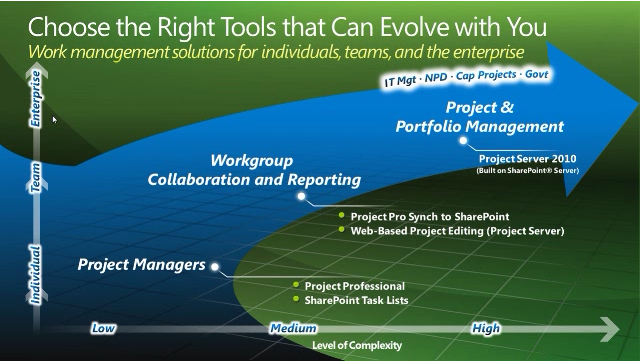
MSProject2010b


Microsoft Project 2010 builds on the Microsoft Office Project 2007 foundation with flexible work management solutions and the right collaboration tools for occasional and professional project managers, and includes a pathway to more advanced project and portfolio management capabilities as business needs evolve.

The project management market is still growing despite the recession. Microsoft Project 2010 seems to be coming at the right time, many people will be able to download cheap Microsoft office. Project management software can help an organization become more profitable by giving them an idea of where they might be wasting resources. It’s also easier to see what areas are lagging and serves to increase individual productivity. With it’s enhanced user interface and tight integration with other Microsoft products, it will be interesting to see what effect this new release will have on existing web-based project management solutions.

Reblog this post [with Zemanta]

Only a Few Hours Left to Get Your Year of Opportunity

BritishAirways

I’ve been procrastinating. I’ve known about this opportunity for a while, but neglected to blog about it. Funny how deadlines sneak up on you when you’re not paying attention. British Airways is running a contest where you can win a Business Opportunity Grant. There is space for more than 1 winner as British Airways is giving away 100 of these grants. The problem is that there is only a short time left to enter (13 hours from the writing of this post), so you’ll have to hurry!

The grant consists of a year of Business Class travel and a suite of valuable business services to help increase face-to-face meetings and exponentially grow your business. Networking online with potential customers and other businesses is all fine and good, but it limits your growth. If you take a look at the social media community, it’s easy to see who ends up on top. It’s those who not only build a following online, but who also take things offline and meet people face-to-face. This is how you make quality connections.

To enter the contest, simply apply by telling BA about your company and answering a few short questions about your objectives for 2010. Make sure you explain how a grant would help grow your business. If your company wins, you will have all of 2010 to turn your grant into new business opportunities. Whether you’re a small business, innovator, or an entrepreneur, this is definitely a contest worth entering.
Click Here

Post?slot_id=60242&url=http%3a%2f%2fsocialspark

Reblog this post [with Zemanta]

Why You Should Be Using Foursquare For Your Business

4sq_mayor_nearbyA few days ago on Black Web 2.0, I covered the reasons why you should be using Foursquare for your business and briefly touched on the specific strategies involved. In addition to reading that post (linked below), you should take a look at this awesome slideshare presentation by Chris Breikss (President of 6S Marketing Inc.) I’ve embedded it below.

The key to leveraging Foursquare for your business lies in the way it promotes and advertises your business. A user visiting your venue on a regular basis can earn a Mayor badge for visiting more than other users. This is where the competition comes in and is only one example of the types of badges available. Not only is the user’s location broadcast on Foursquare, but users can link up both Twitter and Facebook. This increases the visibility of your business across the web.

via Why Should Your Business Be Using Foursquare? | Black Web 2.0 .

Reblog this post [with Zemanta]

Hulu Adds Continuous Play So I Can Watch ALL of Naruto

There is one feature that I’ve always expected to see on Hulu, but finally figured out that it didn’t exist. Let’s say you want to watch Naruto Shippunden, but you don’t want to just watch a couple of episodes. You want to watch all of it. From episode 1 season 1 to episode 126 season 4. You had to add each individual episode to your queue in order. That’s 126 clicks! More if you count scrolling through episodes and seasons. I’m no UI expert, but I’m pretty sure that’s bad design. Where is the “Select All” button at?!

Well, it looks like Hulu was aware of this flaw and has recently fixed it. Continuous play makes it simple to watch sequential episodes of any show on Hulu. No need to add each episode to your queue. Just find the show you like and click turn Continuous Play on. You can click “Show Playlist” so see what episodes are included, hover “Next Video to see what’s coming next, and (when the credits start rolling) click “Next Video” to skip to the next video.

NarutoHuluContinuous

Now on every video player on our site, you’ll see a new Continuous Play bar under the video player. On the far right is a dropdown that shows what playlist of videos Continuous Play is working from. For now, there are three primary types of playlists. One is Your Queue, mentioned earlier. The next class is Collections, which have always been part of our site, but which now play continuously. The last type of playlist is more of whichever title you’re watching. If you’re watching a bit from Saturday Night Live, the playlist will be “Saturday Night Live” and will play more sketches from SNL in sequential order. If you’re watching an episode of 30 Rock, Continuous Play will play more episodes of 30 Rock in sequential order.

This feature will make it even easier to waste hours of your life. You click play once and disappear for as long as you like.

What do you think about Continuous Play? Were you craving it as much as I was? Leave a comment.

Reblog this post [with Zemanta]